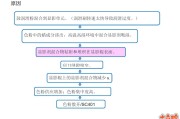
SC325: Development motor error SC395: Drum motor error cause The ground plate of the drum cleaning unit is deformed/dirty, causing grounding errors, abnormal noise, disturbing the motor control signal, and abnormal operation of the drive motor. **** This...
Symptom SC395 (drum motor error) Cause The lubricating scraper does not contact the IFB properly, causing the tip of the scraper to curl and the IFB to rotate too much lubricant. The faster the line speed, the greater the likelihood of a problem occurring. **** This content has been hidden by the author...
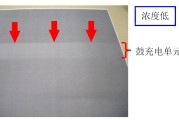
Ricoh Pro 8100s 8110s 8120s Print Copy Image Blurred Symptoms Halftone and Text Image Display Low Density or Blurred. The symptom spacing appears to be the width of the drum charging unit. note: in addition to the above symptoms,...
Symptoms Highlight streaks appear along the direction of paper feed The problem is difficult to see on pages that only print text. Cause The 2 brake pads (p/n: D1794153) installed on the fixing separator plate in the factory assembly are not installed. No brake pads, fixing...
Symptoms Fixing drive gear wear rusty. You can view the rusty gear in the fixing unit around the idler gear. Cause The teeth of the fixing drive gear are worn and not durable. Affected models: Pro 8100EX/S , Pro 8...
A paper jam occurred in the verification paper tray during symptom output, error code 157. Due to repeated contact with paper, the Mylar was damaged, resulting in cracks that subsequently expanded. Solution production line: change the shape of Mylar (corrected part number).**** This content...
Symptom SC720-75 (tension roller moving motor error) appears after two consecutive occurrences of J109 or J122. The reasons and solutions are shown in the table below: Link: https://pan.baidu.com/s...
Ricoh Pro 8100s/8110s/8120s toner scattering code SC401 solution: As a temporary workaround, use the tool on the next page to clean the developer mixture adhering to the surface of the developer roller, preventing the squeegee gap from narrowing. When...