
|
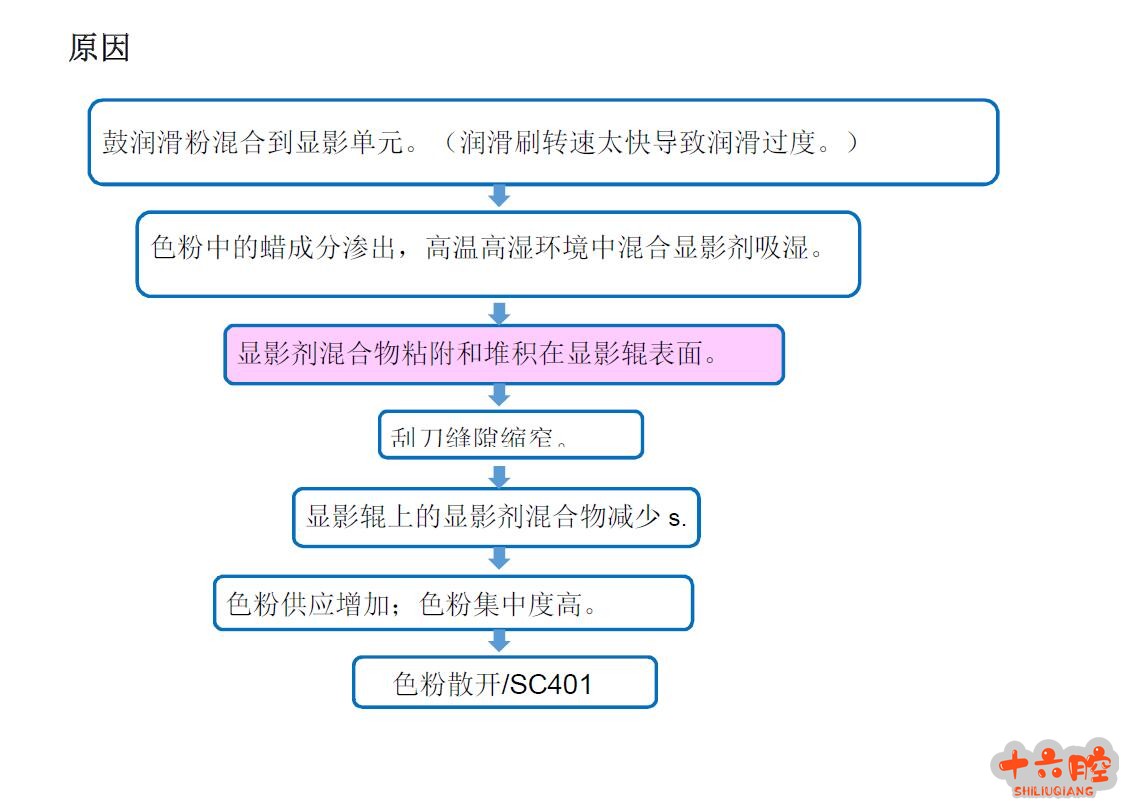
Ricoh Pro 8100s/8110s/8120s Toner Scatter Code SC401 Solution
Temporary solutions Use the tool on the next page to clean the developing mixture adhering to the surface of the developing roller, preventing the blade gap from narrowing. When to clean: when changing developer (800K pages) Duration: about 10min Cleaning belt: Note: Developers produced after September 2015 will contain the cleaning belt (p/n: D1793414). Link: https://pan.baidu.com/s/1zfcBMlNDuDJ7NAlU-uVmQQ Extraction code: ofi3 Cleaning steps 1. Remove the old developer. 2. Place a large sheet of paper in front of the machine to prevent the developer/toner from spilling on the floor. 3. Pull out the PCDU. 4. Remove the drum cleaning unit. 5. Remove the drum. 6. Remove the developing unit cover. (Screw x3) |
Address of this article:https://073868.com/post/226.html
Copyright Notice:
For relevant infringements, reports, complaints and suggestions, please send E-mail:weixiuwang68@qq.com






