
A collection of firmware upgrade methods for all current Ricoh models.
Note: Regardless of which method you use to perform the firmware upgrade, do not power off the device during the process, as this may cause hardware damage.
Production of SD card for firmware upgrade of 2. A3 model:
1. 1) Prepare a 2G or smaller SD card according to the following models:
Low-speed black-and-white machine: Bric-MF2(M2700, M2701), and previous series models
Medium and high speed black and white machines: Cor-C1.5 (MP2555-MP6055), Le-C1(MP305), and previous series models
High-speed black-and-white machine: MT-C6 (MP6503-MP9003), and previous series models
Medium and low speed color machines: Metis-C2.1 (MPC2004ex-MPC6004ex), GR-C3(MPC407), and previous series models
High-speed color machine: CH-C2(MPC6503, MPC8003), and the previous series of models
The firmware of the above models includes: single firmware of the host (including optional parts such as pager and automatic document feeder), Java firmware, SOP firmware and Package (only host firmware collection, excluding SOP intelligent operation panel and Java).
2) Prepare 2G - 32G capacity SD card according to the following models:
Low speed black and white machine: Bric-MF2(M2702)
Medium and high speed black and white machine: Cor-C1.5 (MP2555-MP6055), CLV-MF2 (IM2500-IM6000)
High speed black and white machine: MT-C7 (IM7000-IM9000)
Medium and low speed color machine: Metis-C2.1 (MPC2004ex-MPC6004ex), Metis-MF3(MC2001, IMC2000-IMC6000), GR-C4(IMC400F)
High speed color machine: CH-C3(IMC6500, IMC8000)
The firmware of the above model includes Package (including host and SOP intelligent operation panel) and Java.
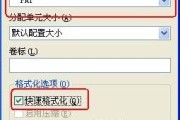
2. Format SD card with FAT format.
Note: It is recommended to use PanasonicSDFormatter (free software, which can be downloaded and used on the Internet) tool for formatting.


Download address: https://www.16qiang.cn/forum.php?mod=viewthread&tid=14860
Tags: #Ricoh #Firmware upgrade #Firmware Upgrade Method #Ricoh copier #Ricoh Firmware Upgrade





Comment list
Method of firmware upgrade
April 16, 2026 19:01