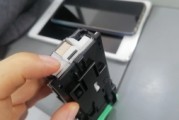
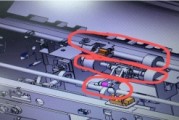
Symptom: After replacing the staples, the 81 page sorter SR5060 does not recognize them and prompts to add staples. The binding action is abnormal. Reason: The nails inside the nail box are stuck. Solution: 1. If the customer operates normally and the machine prompts that the nails are used up, replace the nail box with a new one and close the pagination ..
Symptom: After the machine is turned on, it reports codes SC471-01, 04, and 05. The transfer belt runs off, and adjusting the deviation roller cannot solve the problem. Reason: The explanation for SC471-01, 04, and 05 in the maintenance manual is: 1. Grinding of the image transfer belt ..
Symptom: PRO 8110S large paper box, single-sided and double-sided. The first side is skewed, and the second side is normal. Reason: 1. Measure the paper size to confirm that the paper itself is not skewed. 2. Use standard A3 paper to pack it in the machine. 2. Test the double-sided of the paper box and it is normal. 3
Symptom: When customers print booklets, the paper will appear J-123 before entering the paginator. After removing the paper jam and continuing to print, it will also jam and appear SC-720-40. Reason: 1. According to the on-site situation and maintenance manual ..
Symptom: During the printing process, the color of the copy becomes lighter and then an error SC361-01 is reported. After restarting the self-test, an error is reported. The left image shows the faulty sample, and the right image shows the repaired sample. Reason: Fault description: TD sensor output error 1: V
Symptoms: Customers report that even if the machine is ready for preheating, the first print job needs to wait for a long time, resulting in a decrease in customer production efficiency and a long wait on the side of the machine. Since the customer’s application scenario involves on-demand printing, many users...
Phenomenon: After fixing the printing job, the paper jam occurred due to the breakage of the paper output motor belt caused by 035. Ricoh/Christie, Ricoh copier repair ..
8300 printing long paper will have vertical bars at the end of the paper, similar to the following picture: Repair ideas and solutions: 1. Check that there are no abnormalities in the inner and outer drive gears and bearings on the shaft frame, and that the 2nd drive gear is normal. 2. Slow down the rotation in the paper library ..
The repair report 8200 reported the fault code SC466-00 and asked the customer what he had done recently. The customer responded that he had changed 2 turns the other day and cleaned the drum. Check the fault phenomenon described in the manual, and focus on checking around 2 turns. maintenance ideas...
Symptom: The customer reported that when the machine resumed printing after experiencing a paper jam, it found that paper box 2 could not be loaded. Reason: According to the customer's description, it should be caused by the customer picking up the paper jam, and there is suspicion of shredded paper. Process: Upon arrival at the site, inspect the paper rolling mechanism ...