
|
Symptom: After replacing the staples, the 81 page sorter SR5060 does not recognize them and prompts to add staples. The binding action is abnormal. Reason: The nails inside the nail box are stuck Solution: 1. The customer is operating normally, and the machine prompts that the nails have been used up. A new nail box should be replaced, and after closing the paging door, multiple nail insertion actions and sounds should occur continuously. Immediately after, it prompts that the staples still need to be replaced. 2. Block the paper on the door switch of the paginator, observe the action of the stapler, and find that the stapler is not nailing. Repeat the nailing action multiple times. 3. Remove the stapler and inspect it. No abnormalities such as broken nail chains or worn gears were found inside the stapler. After cleaning the stapler and retesting, the fault still persists. 4. Continuing to observe the nailing action of the stapler, it was found that the nails could not be removed and the customer had a nail box that was almost used up. After replacing the old nail box and testing, no problems were found, but the problem reappeared when a new nail box was replaced. Determine if there is an issue with the new nail box. 5. Remove the new nail box and open the head of the nail box for inspection. There are no abnormalities. Remove the head nail, pull out the back few nails for testing, and the fault persists.
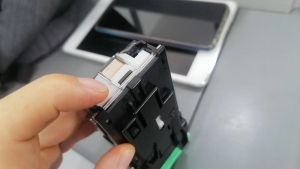
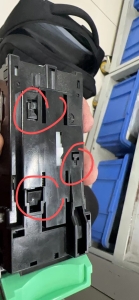
6. The old nail box is fine. Install the nails from the new nail box onto the old nail box for testing. 7. The fault disappeared and the printing was normal. Immediately check the inside of the new nail box, and it was found that there were serious stuck nails inside the new nail box, causing obstruction and inability to remove the nails. 8. After removing the nails from the new nail box, reinstall the nails into the new nail box and test it to be normal. Precautions: Nail removal method: 1. Move the three marked positions in the diagram and lift the back of the nail.
2. Lift and wave the white button to pull it out.
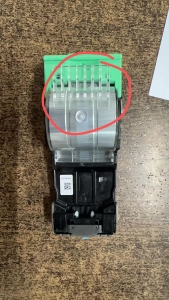
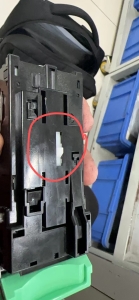
Installation method: 1. First, pull out a small part of the nail, which can be precisely clamped with the white button. 2. First, place the nail in this direction into the nail box, press the white button on the back to secure it, and then press the back of the nail to secure it. |
Address of this article:https://073868.com/post/5495.html
Copyright Notice:
For relevant infringements, reports, complaints and suggestions, please send E-mail:weixiuwang68@qq.com







