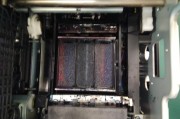
Handling process: 1. Pro500 print breaks and lacks color (B, Y), perform print head cleaning and deep cleaning, but the fault persists. 2. Carefully observe the inkjet condition during the machine cleaning process, and there is also ink spraying on the cap, indicating that the pump is working ..
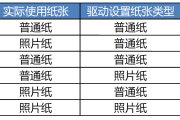
Strangely, when the repairman used regular paper for nozzle inspection, they were able to complete the printing task normally, and then conducted relevant tests on the lower paper feed without any errors. Therefore, we tried to combine various usage methods for testing and found the following pattern: ..
Symptom: The printer powers on and enters standby mode normally, but when printing a test page, the red color is missing. The machine cannot pass calibration, and a calibration error occurs. Processing process: the printer engine test page prints red missing, check that the machine uses original consumables, machine....
Fault phenomenon: The machine is sometimes good and sometimes bad. When a problem occurs, the machine display screen lights up, the start bar runs to the end, the screen displays normally, and the menu keys display normally, but it will automatically shut down shortly. Process: 1. When the machine malfunctions and the fan does not turn, suspect the fan ..
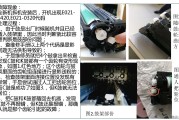
Trouble phenomenon: after the new machine is disassembled and installed, there is a E021-0420 in the startup, E021-0320 the code processing process: 1. since the drum is random when leaving the factory and has been inserted into the drum frame, it is easier to judge at that time...
Processing process: 1. There is no sound when starting up, and an error E840 is reported. It is necessary to judge whether the fixing drive component is working normally. 2. It is necessary to judge whether the fixing drive component is working normally. 3. The fixing motor is controlled by the drive circuit board. 4...
Fault phenomenon: The color correction of the black new toner cartridge cannot be achieved (cannot be recognized). Handling process: The installation of the black new toner cartridge cannot be recognized and an error is reported. It is normal to understand that it is a problem with the contact of the toner cartridge or a problem with the new toner cartridge. Replace the toner cartridge and use the high-voltage board for electric shock ...
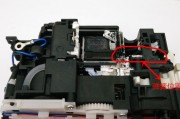
Processing Process: (Actual Situation) The machine cannot start normally because it flashes alternately for 3 starts. The computer status display 6000 is wrong, which is checked as the maintenance manual. The reported 6000 error is a traveling paper error. The possible problem is that the disc coding disc moves abnormally and the problem is...
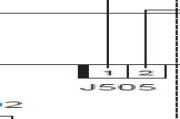
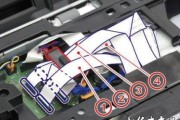
Troubleshooting process: 1. Following the repair manual’s instructions, the scan unit and motherboard were replaced, but the fault persisted. 2. Unplug the trolley unit cable, troubleshoot, refer to the maintenance manual for comparison of the trolley cable, and find that ③ and ④ connections are plugged in reverse, and the fault occurs after correct connection...
Symptom: The first page prints normally, but the second page takes a long time—about 12 seconds—before printing begins. Troubleshooting process: Typically, slow printing is attributed to insufficient fuser temperature. After inspecting the fuser unit with no abnormalities found, and based on past repair experience, the drum detection circuit was also checked with no issues detected. Inspection...