If J430, 431, 445, 446, 460, or 461 is displayed, this issue can be caused by a variety of factors. Take the following measures. Note [*] non-coated paper in the feed tray is not fed, and the paper tray in the host is passed again...
recovery SC499-03 causes [*] dirty belt ruler [*] transfer belt speed feedback sensor dirty [*] transfer belt speed feedback sensor bad [*] plug disconnect or wiring harness disconnect [*] tdcu bad solution [*] clear...
Resume SC591-00 Cause The adjustment failed because the two paper feed sensors 1 and 2 are dirty. The two paper feed detection function is disabled, but the SC code will not be displayed and the user will not be notified. (record SC591-00) solution set...
Display J099 (Vacuum Feed LCIT) This problem can have several causes. Take the following measures.[*] In the custom paper settings, set the 112: [Blower Fan] to "Initial value 10...
Causes of paper jams related to double-sided/reverse fine particles and thick paper [*] Insufficient transfer force of thick paper leads to frequent paper jams (especially J080, J085, and J086).[*] Double-sided printing length is less than or equal to 215.9 m...
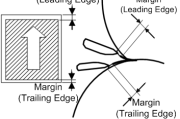
Insufficient separation of the thin paper causes paper jams The lack of margins at the tip of the paper allows the fuser roller's separation plate to grab the paper, causing paper jams. When double-sided printing, the lack of margin at the end of the paper allows the pressure-side separator to grab the paper. Very easy to happen....
Scratching, streaks, ripples or wrinkles (linear speed adjustment of unwinding unit) The following problems occur in machines equipped with unwinding unit:[*] Scratching or streaks on printed parts [*] Abnormal noise on transfer [*] Waviness or wrinkles on printed parts in vertical transfer direction [*]...
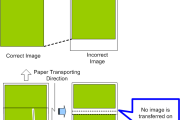
Image confusion, scratches, stripes, ripples, wrinkles (fine adjustment of line speed) reasons [*] The transfer roller line speed may be too fast: the edge margin at the top is too narrow, causing the entire image to shrink Paper folding, with no image on the folded part The transfer roller line speed is too slow ..
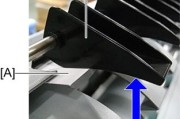
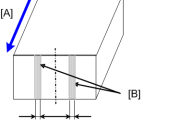
The paper edge appears roller printing [A]: Paper output direction: The transfer roller has dirt adhesion reasons..., Ricoh/Kissinger, Ricoh copier maintenance...
The reason for J080 is that the alignment position of the secondary scan is checked and calibrated by increasing/decreasing the line speed of the transfer timing roller. If the paper position exceeds the threshold (± 3.0 mm), J080 occurs. [*] Smooth paper, low friction coefficient between papers, conductivity ..