Ricoh Pro C7100 C7110S Insufficient separation of tissue paper causes paper jam
Visitor3340
Insufficient separation of thin paper leads to paper jam
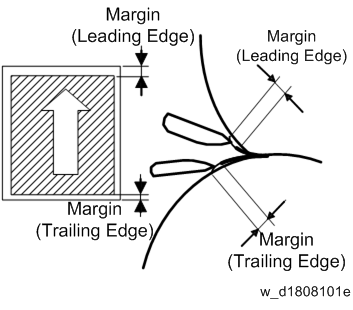
ReasonThe lack of margin at the top of the paper allows the separation plate of the fixing roller to grab the paper, resulting in paper jam. When double-sided printing, the lack of page margin at the end of the paper allows the pressure side separation plate to grab the paper.Easy to occur situations:
Use thin paper
Use copperplate paper
Solid image, with a large amount of color powder adhering to the tip of the paper
Narrow margin at the top of the page
Solid image, with a large amount of color powder adhering to the end of the paper
Large magnification, narrow margin at the end of the page
SolutionIf the mask width at the top of the paper can be widened, or the erase blank at the end can be widened;
The technician adjusted the current value of 0106 [Adjust Erase Margin With Feed Direction] in the settings by+0.5 mm. In the custom paper settings, the current values of 011 [Adjust Erase Margin of Trailg. Edge: Prod.] and 012: [Adjust Erase Margin of Trailg. Edge: Qual.] are+0.5 mm.
Print the target image.
Has the problem been resolved? Yes: Done
No: Repeat steps 1 to 3. If there is no improvement even after reaching the maximum value, request the customer to use other paper.Note
The custom paper settings are different for each machine's printing mode.
Print mode
Application Items
B/W, FC, FCS, S only
011: [Adj. Erase Margin of Trailg. Edge: Prod.]
FCS Quality
012: [Adj. Erase Marg. of Trailg. Edge: Qual.]
If the mask width at the top of the paper cannot be widened, or the erase blank at the end cannot be widened;
Can the image position be changed? Yes: Go to Step 2
No: No improvement. Request the customer to replace the paper.
The technician adjusted the settings to set 0102 [Adjust Image Position With Feed Direction] to a current value of+0.5 mm. In the custom paper settings, set 033 [Paper Transfer Current; Trail Edge: B&W] to a current value of+0.5 mm
Adjust the position of the reverse image based on the front image. In the custom paper setting, adjust 004 [Adj Image Position of Side2 With Feed]
Print the target image.
Has the problem been resolved? Yes: Done
No: Repeat steps 2 to 5. If there is still no improvement in the maximum value, request the customer to use other paper.
5-804-001 paper feed motor 15-804-002 paper feed motor 25-804-003 paper feed motor 35-804-004 paper feed motor 45-804-005 hand feed paper feed clutch...
Q: One piece of original powder is printed less than 2 kilometers. When the machine is turned on, it is found that there is a lot of powder leakage on the transfer roller. After removing the development and cleaning ID sensor, will the 3103Vsp value 0.07 be too low and a large amount of powder will be added?...
A collection of firmware upgrade methods for all current Ricoh models. Note: No matter which of the following methods is used for firmware upgrade, do not shut down during the upgrade process, this operation will cause damage to the machine hardware. 2. A3 models firmware upgrade SD card production...
Ricoh copier basic principle, imaging principle and copier foundation, color basic principle 1, imaging principle and copier foundation 2, color basic principle 3, machine test sample printing 4, parts manual use training materials 5, dot map use method m...
Symptoms: Keith Deyer cp6303c Machine Printing Times Failure E-02 Causes: 1. Paper table motor problem and poor paper table drive; 2. The height sensor of the paper table and the lower limit sensor of the paper table are not good. 3. Bad motherboard. 4. Harness connection...
Issue: Exporting a profile configuration that contains a large number of workflows and groups does not start the download and cannot be displayed. Occurring condition: A user attempts to export a profile configuration that contains a large number of workflows and groups. Reason: Due to the group and work being processed...
Ricoh IM C320F_P C375_M C320FW Solution to Drum Unit Setting Error after Memory Clear Symptoms When Memory Clear: Clear All (SP:5-801-001) is performed, for example, due to forgetting to log on...