Symptom IMC2000 purchased a dual paper box unit PB3300, but an error message appeared when turned on: "The lid is open, close the indicated lid", which cannot be eliminated. Repair process: 1. Test by entering code SP5803-217 ..
Symptoms: The "SC491-00" code suddenly appears on the panel during the use of the machine, and the shutdown and restart cannot be eliminated. According to the explanation of the maintenance manual, the output problem of high voltage power supply (charging or developing bias); One by one, check the reasons: 1...
Symptom printing and copying of color images are normal, with light black images. The fault sample is shown in the following figure: Diagnostic process 1) Check the contact and release mechanism of the black image transfer roller in the ITB unit, which can be contacted and released normally without any abnormalities. 2) Check the black PCD
IMC3000 prints normally, and color bars appear in the main scanning direction at the bottom of the printed material during copying and scanning; Fault photo: Possible causes: poor CMOS/SBU/SBU cable/BUCU repaired ..
The imc2500 prompt cannot detect the red powder box. After replacing the new red powder, it is still prompted. Check that the red powder is the original powder, eliminate the problem caused by the powder chip, check the red drum. The customer has just replaced the new one, check the powder adding funnel, and find that the lower powder screw rod is broken. After repair...
Symptoms cannot be previewed when using the scanning function. Repair process 1. Whether scanning to a folder or scanning to an email, preview cannot be selected during scanning, and the preview area is grayed out; If the file type in the sending settings is set to TIFF or J
Symptom: The newly installed machine, copying and printing are normal, and the HDI card reader is inserted into the USB slot and cannot be recognized. Analysis of causes and measures: 1. Incorrect VID\PID setting, check VID\PID setting, no...
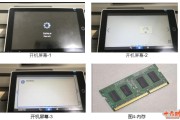
Symptom: The IMC2500 machine cannot enter the normal operation interface when turned on, and then shuts down. After booting up, it displays "starting up face wait" as shown in Figure 1, and then enters Figure 2 ..
Ricoh imC2000, C2500, C3000, C3500, C4500, C5500, C6000 training materials and ARFU network configuration, web help support, as well as remote connection support ..