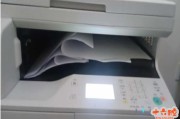
Canon low-speed black-and-white machine paper curl, paper jam (paper front end enters photosensitive drum) adjustment instructions paper curl jam (paper front end enters photosensitive drum) low-speed black-and-white machine paper curl, paper jam adjustment method [*] machine use environment, paper quality different.....
Canon iR 2206,2206,2204,2202,2002 Series Machine Field Technical Treasure Book Maintenance Case 1 Image Failure 1-1. Sub-scanning direction Copy output image Black bar (print output image normal) 1-2. Since...
Canon iR 2206 Series Installation Manual_Ver. 1.0 Use the method of this installation step to check and install the host heating assembly-M2/carton heater -40 double-sided assembly-C1 carton-BB1 double-sided automatic document feeder-...
iR 2202/2002 Series iR 2204 Series iR 2206 Series Theme Countermeasures Solve 0104 jams that occur. Description: Because the machine uses different quality paper, the paper in the first paper tray is not rubbed up...
Applicable product series: iR 2206 series/iR 2204 series [Trouble phenomenon 1: horizontal scanning position offset] The horizontal scanning position of the image is offset during copying and scanning on the platen, and black edges appear at the edge of the image. as shown in the figure below...
Product model: iR 2202/2002 series iR 2204 series iR 2206 series NPG-59 drum separation claw pasting method FAQ theme countermeasures to solve the problem that the front end of the paper enters the drum, 010 occurs...