
|
Applicable product series: iR 2206 Series/iR 2204 Series [Trouble phenomenon 1: Horizontal scanning position offset] When copying and scanning on the platen, the horizontal scanning position of the image is offset, and black edges appear at the edge of the image. As shown in the figure below, black edges appear on the back end of the printed image.
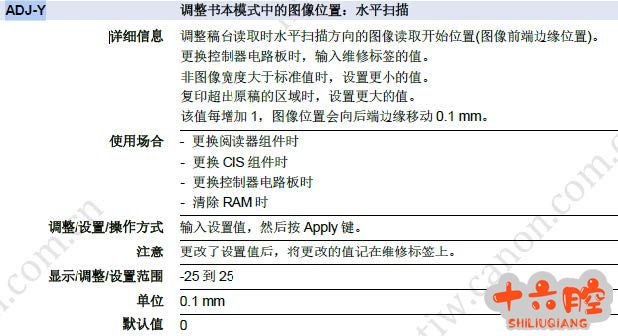
[Cause of Failure] The above problems occur due to abnormal reading image position. Most of the above failures occur when installing new machines on site are due to abnormal image reading position due to poor transportation. [SITE COUNTERMEASURES] Adjust the image reading position 1. Use the hand tray to copy the test card 2. Compare the side misalignment between the original and the copy of the test image, and refer to the following for adjustment as needed. 3. Use the following repair mode to adjust the offset of the image according to the offset direction of the image. Service mode: COPIER > ADJUST > ADJ-XY > ADJ-Y
Adjustment method:
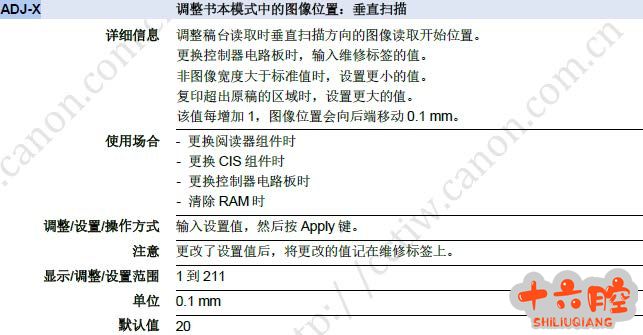
4. After adjustment, re-output the image to check whether the copied image is normal. 5. Record the adjusted value on the maintenance label. [Failure phenomenon 2: image front edge offset] When copying and scanning on the manuscript table, the front and back ends of the image are offset, and the front edge of the image is located. [Cause of Failure] The above problems occur due to abnormal reading image position. Most of the above failures occur when installing new machines on site are due to abnormal image reading position due to poor transportation. [SITE COUNTERMEASURES] Adjust the image reading position 1. Use the hand feed tray to copy the test card. 2. Perform the following adjustments in service mode 3. Compare the misalignment between the original and the copy of the test image, and adjust according to the size of the misalignment with reference to the following contents. 4. Use the following repair mode to adjust the offset of the image according to the offset direction of the image. Service mode: COPIER > ADJUST > ADJ-XY > ADJ-X
|

Address of this article:https://073868.com/post/2671.html
Copyright Notice:
For relevant infringements, reports, complaints and suggestions, please send E-mail:weixiuwang68@qq.com
Tags: #2206 #2204 #Scan Position Offset #Black Edge







