1. M126, M128 series, mobile device wireless connection (including wireless direct connection and wireless access to the same network), can only achieve printing function through HP mobile printing APP (HP smart), does not support scanning function ..
Fault description: After replacing the motherboard of the M16/M128 series printer, it is necessary to use the Galileo tool to reconfigure the motherboard model, otherwise it will not work properly. Principle explanation: 1 In addition to using hardware Galileo tools, it can also be done manually ..
Suitable products: M1126/M128/M176/M177 series laser printer fault description: after the firmware upgrade program is running, it is indicated that the firmware cannot be connected to the printer, resulting in the firmware cannot be upgraded. USB mode and network mode are as follows...
Suitable products: M126, M128 series products. Fault description: After the printer is powered on, there is a self-test sound, and the single screen keeps showing that initialization cannot be ready. Troubleshooting approach: 1 This problem is mainly caused by the following reasons, but ..
Fault description: during the printing process of the 128 printer, the motor suddenly accelerated from the sound judgment, and half of the paper feed reported a paper jam. the fault phenomenon pointed directly to the motor control board. after the motor control board was replaced, the fault phenomenon occurred from the original first sheet of paper or the second sheet of paper,...
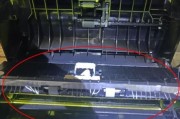
Fault description: M128/ 1219 series machines with ADF components use ADF paper jam as shown in the figure: solution process: first open the paper feed tray of ADF, check whether there is any foreign matter in the paper path, as shown in the figure: then check whether the paper roller link rod gear is...
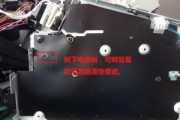
Fault description: M128FP intermittently starts up and restarts repeatedly, and cannot be ready. An engineer needs to come to inspect and repair it. Solution process: When the engineer came to the site, the fault was not reproduced. The customer described that it would occur within two to three days, and the machine would restart repeatedly when turned on, sometimes causing disconnection ..
Suitable products: M126, M128. Fault description: No power supply when turned on, and the control panel switch does not light up when plugged in. Processing steps: 1 Firstly, ensure that the connections on the motherboard and power board are properly connected, and then re plug and unplug the connections on the motherboard and power board
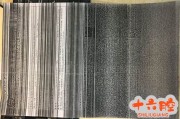
Machine model: M128 Repair process: The user sent a M128 printer for repair, and the fault was black shadow printing (see the fault sample). The user's machine was found to be non original consumables, and considering the high probability of this malfunction, the consumables were replaced with original ones ..
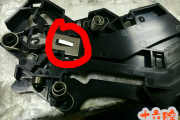
HP M128/M1136/1106/1108 laser printers of this type print completely black, or have words but are also completely black. Fault background: Print the entire sheet of paper completely black, some have words but are also completely black at the bottom, replacing the original toner cartridge is ineffective ..