
|
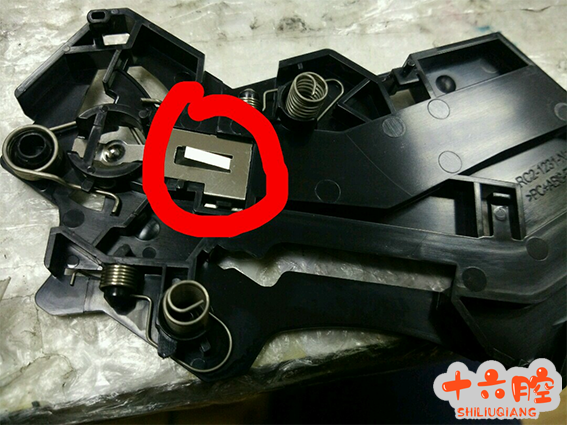
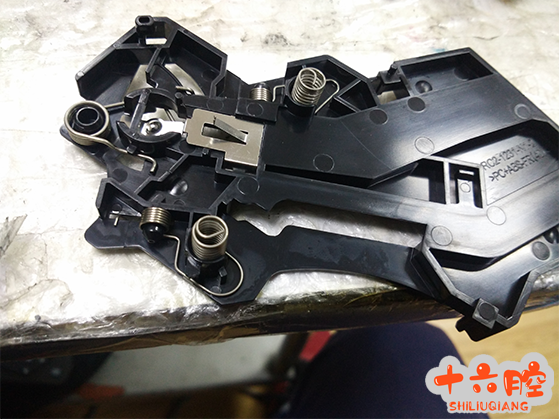
HP M128/M1136/1106/1108 laser printers print all black, or have words but are also all black Background of the malfunction: Printing the entire sheet of paper completely black, some with text at the bottom but still completely black, replacing the original toner cartridge is ineffective, the charging contacts of the toner cartridge are not deformed, and the printing engine page is also completely black. Replacing the power board is ineffective. By observing the fault symptoms, it can be determined that it is not a charging fault. That may be a discharge fault of the toner cartridge. After removing the toner cartridge guide rail (on the power board side), it was found that the iron plate for discharging the toner cartridge was not so raised, so the contact with the rack was not so obvious. Finally, the iron plate was bent outward and reinstalled, and the fault was resolved.
Note: After installing the toner cartridge guide rail, you need to manually move the toner cartridge sensor guide rod. If the reverse rod cannot be easily returned to its original position, then the toner cartridge guide rail is not installed in place |
Address of this article:https://073868.com/post/5991.html
Copyright Notice:
For relevant infringements, reports, complaints and suggestions, please send E-mail:weixiuwang68@qq.com
Tags: #M128 #M1136 #1106 #1108 #Print All Black







