HP M128 boot has been stopped at initialization to exclude ideas
Visitor2930
Fault phenomenon:
There is a self-test sound when the machine is turned on, but the screen always shows that the initialization cannot be ready.
Exclusion of thought process analysis:
The machine has been stopped at the initialization step and cannot be ready. Due to the design of this firmware, it is sometimes impossible to accurately indicate the fault information, such as scanner 52, thermocoagulant 50, scanner 13, etc. This depends on the damage degree of this spare part. It is common to stop at the initialization of a certain part after self-inspection.
This fault generally has the following two possible:
1. The firmware is not loaded normally and there is a firmware problem.
2. A hardware has not been self-checked in the past, resulting in inability to be ready.
Troubleshooting: 1 Firmware troubleshooting:
First do the NVRAM initialization:
LED screen press and hold COPY to cancel the boot, when the screen appears Permanent Storage Init let go.
Touch the screen machine, press and hold the lower right corner of the screen to boot until the Permanent Storage Init to let go.
If that doesn't work out, try doing Super NVRAM initialization:
Press and hold the right button on the LED screen to cancel the startup. When a Permanent appears on the screen, Storage Init to let go.
Touch the screen machine, press and hold the lower left corner of the screen to boot until the Permanent Storage Init to let go.
If the fault persists, try to refresh the firmware, download and refresh the firmware. If the firmware fails or fails to be refreshed, please try the following hardware test steps.
2 Hardware test:
You can open and close the five lower door covers to check whether the engine page can be printed. If it can be printed, it means that the main board, fax board and scanning platform have a spare part damaged. You can test online whether it is possible to print to judge whether the main board is abnormal, disconnect the fax board to check whether it is ready, and turn on the machine to check whether the scanning head is bright and moving during self-checking.
If it cannot be printed, it indicates that one of the heating components, laser, motor and ECU may be damaged.
Inspection of the heating element: you can check whether the heating element is preheated by touching whether the heating element has temperature.
Inspection of laser and motor: when starting up, you can listen to whether the motor and laser have self-checking sound, the laser self-checking will have "chirp" sound, and the main motor will have obvious "buzzing" sound when rotating. the normal total process of self-checking sound is about 14 seconds, there will be a pause of about one second in the seventh second, and then the self-checking will continue.
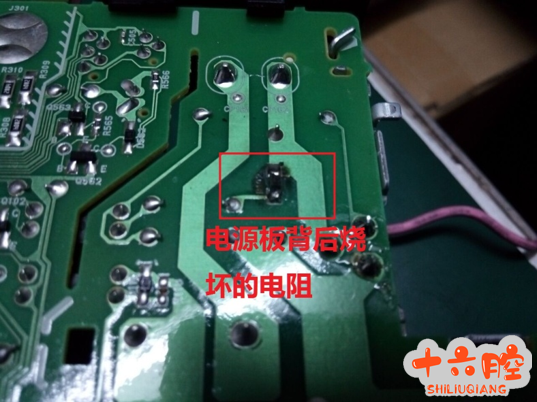
The above steps basically exclude the main spare parts of heating components, lasers and motors. Only the ECU board is left below. This board contains some circuits of low voltage, high voltage and DC control. Remove carefully whether there is any abnormality. In this case, the electronic original device of ECU board is burnt out and cannot be ready.
At present, there have been three cases of failure caused by the same resistor of the power board being burned out.
Ke Mei C14000,C7100,C4080 Quick Reading Guide 1. About Quick Guide The quick guide provided for each product outlines the information required to use this system in an easy-to-understand manner. Before using this system, please read...
This instruction describes how to initialize the administrator password and service password MX3050/3060/3070/3550/3560/3570/4050/4060/4070N series default. Please note that once...
problem description:-the user's ns MFP1005/ns 1020 after use for a period of time, when continuous printing, there will be print content intermittent up the problem, as shown in the figure below the cause of the problem:-after use for a period of time,...
Involving models: M104/M132/M203/M227 series fault phenomenon:-the right gear set has a very large continuous sound of gear tooth hitting during power-on self-test, and then the panel prompts 59.C0 or the ready warning light is always on...
fault: hp Laserjet pro m128fp mfp printing paper jam, paper card in the heating components, print fonts and patterns have stretch stretch deformation fault analysis: 1. engineers on the machine line a simple test...
Suitable products: M1005,M1020 Fault Description: The printer does not stop feeding paper. The customer sends and repairs an M1005 printer to start up and does not stop feeding paper. Generally, this situation is mostly related to relays (clutches). as shown in figure 1: red...
Failure phenomenon: CP1025NW cannot install WIFI printer failure analysis: customers reflect that the machine has been unable to install wireless printing function. Prompt for password every time. No password was previously set. door detection first with usb cable even...
HP laser printer (especially multifunction machine) outlet has water vapor condensation instructions [*] water vapor and printer has nothing to do with, the printer itself does not produce water vapor [*] water vapor is because the printed paper moisture, in the heating process is evaporated out...