Symptoms IMC3000 boot prompts SC220-01, and functional problems will occur. Picture measures 1. Reseat all the wiring harnesses of the laser unit, and the fault remains; 2. Replace the laser unit and power board, and the fault remains; 3....
Symptoms: IMC6000 users find that the machine has not been able to recognize black toner and replace another new toner when replacing toner because the machine has no powder. On-site maintenance, enter maintenance mode, 3-100-001 close...
Symptom: When a M C2000 machine outputs color files (printing/copying), there is a magenta background color covering (as shown in Figure 1), and the image is normal when outputting black and white. Repair process: 1. Install the magenta PCDU unit of the faulty machine onto another machine ..
Symptom: When a Ricoh IMC3000 selects the rotating paging machine during the copying process, an error message will appear saying "Put the paper into a paper box other than paper box 1", and the copying task cannot be completed, as shown in the picture. Possible reasons: incorrect settings/EPRO
Symptom: IMC2000 color photocopies may have colored lines at the edges, and there is no reason for using black and white 2. Defective PCDU 2. Defective transfer unit 3. Defective CB high-voltage plate 4. Defective transfer high-voltage plate 5. Defective laser unit ..
Symptom: When customers print color PDF drawings in black and white, there is a situation where the original color lines of the printed product are not black. Repair process for partial images of printed electronic documents: 1. Check the "Print as bitmap" option on the PDF software printing interface
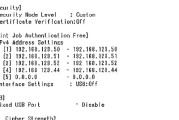
About setting up print authentication exclusions, after setting up print jobs for computers in this network segment do not need to be authenticated. maintenance process 1. print network configuration page can be seen which has "print job Authentication...
fault phenomenon: new user tools under the open remote screen control method of processing: 1. reset -806182-## c enter the maintenance mode of the screen select "screen device settings" 2. select "Applicat...
When there are different models of color machines printing the same file with significant color deviation at the customer's location or when the customer prefers colors from other models, IMC series models can adjust the color by changing the configuration file settings of the machine to approach the colors of other models ..