
|
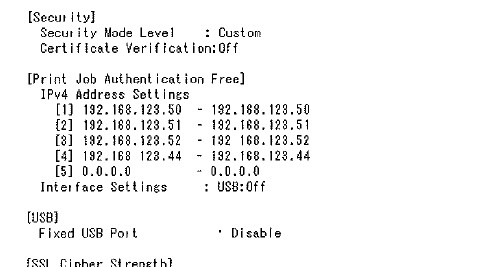
Symptoms Regarding the setting of print verification exclusion, after setting it up, the print jobs of the computers in this network segment do not need to be verified. Maintenance process 1. When printing the network configuration page, you can see the "Print Job Authentication Free" section;
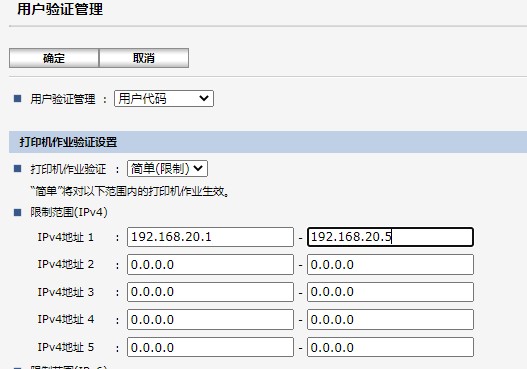
2. Enabling method for this setting: [kkpay=5]In the user tool or log in to the machine webpage, set "Printer Job Verification" to "Simple (Restricted)" in the user verification to enable the print verification exclusion function. Print jobs on computers within the network segment are not subject to verification restrictions;
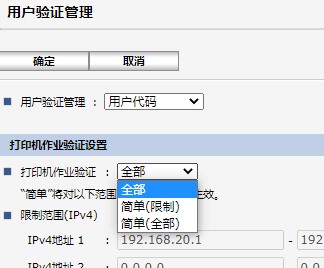
3. The method to disable this setting.. Method 1: Set printer job validation to "All" or "Simple (All)"
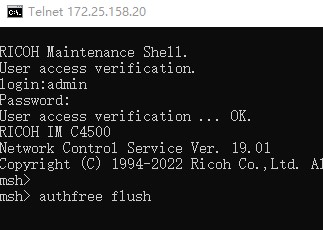
Method 2: Log in to the machine using telnet and use the "authfree flush" command to clear the settings.[/kkpay]
|
Address of this article:https://073868.com/post/1240.html
Copyright Notice:
For relevant infringements, reports, complaints and suggestions, please send E-mail:weixiuwang68@qq.com
Tags: #C3500 #Print verification #Setting method #c4500 #c6000






