
|
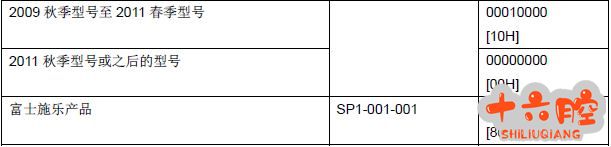
Symptoms When there are different models of color printers at the customer's location that print the same file with significant color deviation or when the customer prefers colors from other models, IMC series models can adjust the color by changing the configuration file settings of the machine to approach the colors of other models, and even match the printing color tone of Fuji Xerox products. Measures Description: 1. By changing the configuration file settings, the color tone of all images printed by the printer function on the machine can be changed. By changing the configuration file settings, the color tone (color gamut) of the printed image can be made similar to other models. However, due to various factors such as differences in image color gamut between different models, individual machine differences, and component aging, it may not be possible to achieve completely identical color tones. Steps to change configuration file settings: 1. Enter the printer SP mode. 2. Use the following SP number to change the value of the bit switch.
Example: There are 8 zeros in SP1-001-002, corresponding to bit 7 to bit 0 from left to right 00000000 76543210 To change from 0 to 1, press the 0 key and then the # key Solution Set up using print SP1-001-001 and SP1-001-002 Others, and so on 3. Turn off the machine power and then turn it back on. At this point, the specified value will be applied. The color tone mode and trend of each configuration file
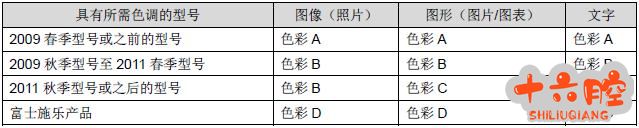
Color A Standard configuration files for MP C2030/C2050/C2030/C2530/C2800/C3300/C4000/C5000 and previous models Color B Standard configuration files for MP C2051/C2551/C3001/C3501/C4501/C5501. Compared to color A, the following changes have been applied: ① The yellow tone of the skin has decreased. ② Enhanced red to avoid looking like vermilion. ③ Green and blue-green appear darker. ④ Use pure cyan tones on graphics to avoid color dullness. ⑤ The pink color in the printed image appears darker. Color C MP C3002/C3502/C4502/C5502 is the standard configuration file for the current model. Compared to color B, the differences between colors become more pronounced. On the other hand, the printed image becomes slightly less vivid. If someone expresses that the printed image of the current model is not very vivid compared to the standard model using color B, it is recommended to change the setting to color B. Color D A configuration file with a printing color tone similar to that of Fuji Xerox products.
|

Address of this article:https://073868.com/post/5604.html
Copyright Notice:
For relevant infringements, reports, complaints and suggestions, please send E-mail:weixiuwang68@qq.com
Tags: #C3500 #Color adjustment #c6000 #c4500 #Dull color







