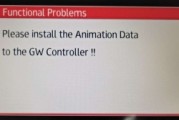
General symptoms of MP4055/MP6055 SOP screen models: an MP4055 executed the SOP operation panel "wipe d" because the GreelandV2 software in the SOP screen could not be uninstalled normally...
MP3555SP an error is reported, the fixing belt unit must be replaced immediately. Is there no other way except to replace it? The printing effect is no problem before the error is reported., Ricoh/Kyocera, Ricoh copier maintenance...
Ricoh MP2555,5055 Series Upgrade Firmware Package Smart Screen Firmware This firmware package has problems, please do not upgrade * * * * This content is hidden by the author * * * *, upgrade firmware, Ricoh copier repair...
No problem with copying-Paper jam during printing. Arriving at the scene, the counter was first printed without paper jam. The machine printed more than 9,000 sheets, which was just a few months old. Next, a few copies (one-sided) will not jam paper. The customer said that there was only jam paper when printing, so he invited guests...
Note that the photoconductor unit is not installed correctly. Check the photosensitive drum assembly for abnormality. Check the wiring harness connected to the photosensitive drum assembly for abnormality. Plug and unplug the wiring harness related to the control unit. The fault is eliminated. The failure is very abrupt and untraceable, and the relevant components can only be excluded in sequence...
Symptoms: frequent paper jam at the double-sided turnover of the machine, and the card will be stuck after printing several sheets: reason: poor turnover sensor, poor turnover of the solenoid, poor turnover of the solenoid, poor maintenance process: 1. by checking the paper jam position of the machine (SMC table SP7504), display...
Possible causes: CCD bad/SIO bad/scanner motor bad/wiring harness bad maintenance process 1. On-site inspection failure, the machine self-check is normal after the machine is turned on, the document feeder scans and copies normally, and SC1 appears on the copy and scan of the manuscript desk...