
|
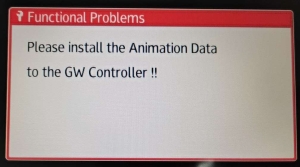
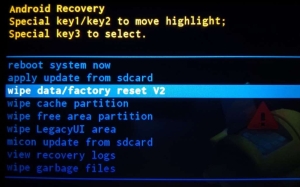
MP4055/MP6055 SOP screen models are universal Symptoms:An MP4055 failed to uninstall the GreelandV2 software on the SOP screen and performed the "wipe data/factory reset" operation on the SOP operation panel. After upgrading the CHN PKG firmware package for the corresponding model, the prompt "Please install the Animation Data to the GW Controller!! ”Error. Due to only erasing data/restoring factory settings on the SOP screen and not involving overall clearing or data changes on the controller board, repeated attempts to restart the machine still resulted in errors.
Solution (After restoring the factory settings on the operation panel, the recovery steps are as follows): 1. Execute the SOP operation panel "wipe data/factory reset"
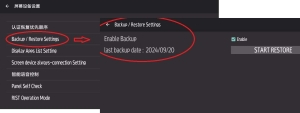
2. Upgrade the CHN PKG firmware package corresponding to the model and restore the SOP factory pre installed APP After booting up, the message 'Please install the Animation Data to the GW Controller!' will appear!! ”Error. The reason is as follows: Cheetah System automatically backs up SOP's own data to the machine's hard drive on a daily basis (including SOP synchronization controller GW function, settings, etc.), in order to quickly restore SOP's normal working state through hard drive backup data in case of problems. The SOP screen has executed the GW function of erasing data/restoring factory settings and synchronizing with the controller, but the settings are missing. SOP will prioritize the quick recovery of previous backup data loaded onto the hard drive (after SOP is cleared, it is no longer possible to restore the original state through backup); Instead of having Youxing re synchronize the GW function and settings of the controller. Causing the SOP GW function and setting data to malfunction and fail to recover normally, resulting in repeated errors that cannot be cleared.
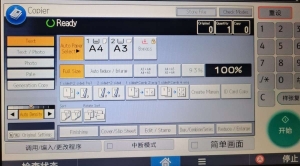
The recovery operation is as follows: Disconnect the controller's hard drive and power on (block the SOP screen compensation test from backing up data from the hard drive). The SOP will reload (synchronize) the GW function and settings with the controller, and the entire process will take 5-15 minutes (observe the screen update display). Then there is no need to turn off or turn on the hard drive again, wait for a few minutes to confirm that there are no new synchronization updates (i.e. disconnect the hard drive and turn it on and off twice), reconnect the hard drive and the startup error disappears, and the machine starts normally. 3. After the machine starts up normally, there may be situations where the user tools and application interfaces are partially in English and partially in Chinese. Use the language switching tool to switch back and forth between English and Chinese twice, and all interfaces will restore a unified language interface.
4. Enter the screen maintenance mode and install the following two apps that do not include the PKG firmware package. The recovery is now complete!
|

Address of this article:https://073868.com/post/5602.html
Copyright Notice:
For relevant infringements, reports, complaints and suggestions, please send E-mail:weixiuwang68@qq.com
Tags: #SOP screen #wipe data #factory reset #3555






