
|
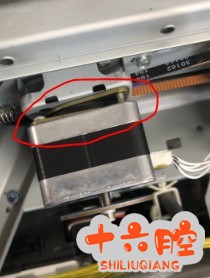
Possible causes: CCD malfunction/SIO malfunction/scanner motor malfunction/wiring harness malfunction Maintenance process 1. Upon on-site inspection of the malfunction, the machine self-test was normal after startup, and the scanning and copying of the document feeder were normal. However, SC121-00 error occurred during the copying and scanning of the document table; 2. The fault remains after the wiring harness is plugged again; 3. Perform SP5-804 output inspection to check that the scanner motor is running normally, and perform SP5-803 to check that the scanner's in-situ sensor is functioning properly; 4. Replace the in-situ sensor of the scanner, but the fault persists; 5. Upon checking the connection of the scanner motor, it was found that there was delamination at the edge of the motor and looseness when it was disconnected from the drive belt (as shown in the sample image). The issue was resolved after replacement;
|
Address of this article:https://073868.com/post/3082.html
Copyright Notice:
For relevant infringements, reports, complaints and suggestions, please send E-mail:weixiuwang68@qq.com







