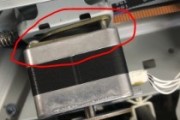
Symptom: SC121-00 produces abnormal noise when the middle scanning frame moves while copying/scanning the original manuscript once or twice. ADF copying/scanning of original documents is normal. Repair process: According to SC121-00 explanation: required ..
The machine started up normally, but after lifting and lowering the document feeder, there was a collision sound. After lifting and lowering the document feeder multiple times, the machine jumped SC120-00 or SC121-00. After shutting down and restarting, the machine returned to normal. After replacing the in-situ sensor of the scanning frame, the fault still persists. Check and scan ..
Possible causes: CCD bad/SIO bad/scanner motor bad/wiring harness bad maintenance process 1. On-site inspection failure, the machine self-check is normal after the machine is turned on, the document feeder scans and copies normally, and SC1 appears on the copy and scan of the manuscript desk...