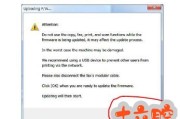
Sharp DX-2008UC Firmware Upgrade Program Firmware Upgrade Tutorial Method A. Version upgrade is required in the following cases. ROM version upgrade is required in the following cases: 1) When machine performance needs to be improved; 2) Install a...
Firmware Update Note 1. Do not operate the machine through the operator panel, access the machine through the Web Image Monitor, or perform fax sending, printing, or TWAIN scan jobs during the update process. 2. updated...
Product Model: EX1000 with C1000P/C800P Theme: 1 Regarding the notification issue and reason for upgrading EX1000 to V2.2 as soon as possible: 1 We have found that some PDF files are being imported ..
1. Connect the computer with a USB cable when turned off, and the USB cable should not exceed 3m. 2. Press and hold the [Power Save] button and turn on the main power of the copier. 3. The progress contract will be displayed on the screen for 10 seconds. 4. The screen will automatically turn black ..