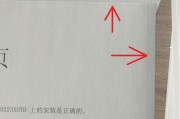
When copying symptoms, the image is normal, the scanned image is normal, and the image of the printed counter page is normal. However, when printing through the computer, there are black dashed borders on all four sides of the paper. The fault sample is shown in the following figure: Diagnosis process 1) Replace the black PCDU, but the fault persists. 2...
During the installation and debugging process of the new machine, SC899 code appeared when the power was turned off by pressing the main operation switch. Reason: The newly installed scanning memory connection is poor. Solution: After unplugging and reinserting the memory, the problem was resolved. Repair process: 1. Install and debug a new machine ..
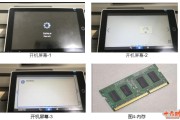
Symptom: The IMC2500 machine cannot enter the normal operation interface when turned on, and then shuts down. After booting up, it displays "starting up face wait" as shown in Figure 1, and then enters Figure 2 ..
The symptom was upgraded from GrennLand V1 to GrennLand V2 on an MPC2550 machine. After installing the software, the machine restarted and experienced SC819 fault analysis. The memory condition of the machine was checked ..
Ricoh MP5500 series is printed with black bottom and covered with text (as shown in the figure below). The preliminary judgment of the effect after solution is as follows: 1. Charging rack 2, toner cartridge 3, memory module 4 and laser were replaced with charging rack first. The problem is still the same...
Fault description: A newly installed 3080 graphics card causes the screen to remain black upon booting. The power indicator is normal, and printing functions are working properly. Sometimes the screen takes up to an hour to light up, while other times it fails to turn on even after a prolonged wait. Replacing OACB, screen, screen wiring does not work...