Involving models: M104/M132/M203/M227 series fault phenomenon:-the right gear set has a very large continuous sound of gear tooth hitting during power-on self-test, and then the panel prompts 59.C0 or the ready warning light is always on...
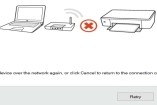
You can find the printer on the network, but when you click on the next step, you will be prompted: you cannot connect to the printer, as shown in the following figure: the system of some companies will prohibit function Discover Provider Ho...
The paper is related. If the paper is not white, the color of the paper will be copied as part of the original when copying. It is shown as bottom ash. If the original is not placed, the white back plate will be directly copied and scanned. If there is no problem, it indicates that there is no problem with the hardware and no dimension is required...
Fault phenomenon: - There are slight scratches on the printed file, as shown in the following figure. Solution: Check if the safety door of the heating component is in the wrong position and adjust it to the correct position. - Safety door (barrier) instructions: When the user opens the selenium ..
Trouble phenomenon:-Print random font thickening, stretching, compression and other problems. Solution:-The user's powder box is filled with powder, resulting in abnormal operation of the powder box, and the failure disappears after replacing the original powder box-in case of such problems, first consider more...
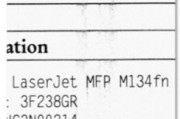
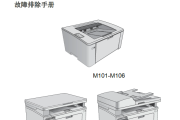
M132 , M134 , M104 , M106 need to refresh the motherboard model after replacing the motherboard [*] refresh file location:- ftp.hpicss.com-/laser printer/consumer laser...
Explanation: The new motherboard does not include model information, and in this case, the BOID file needs to be refreshed. The specific steps are as follows: 1. Download the BOID file of M132A from the corresponding product directory on FTP; 2. After the printer is powered on, it can be used with a computer
Laser printers involved: M132, M227, M180, M181, M280 and M281 series, all use the same platform scanning platform (Bamboo) problem description: M227 series, if you do not connect the tablet...
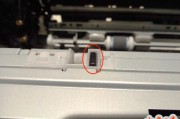
HP M104, M106, M132 and M134 series printers report 52 errors after disassembling and assembling the laser. This series of printers have a device for blocking the laser beam, which is related to the toner cartridge cover and is used to block the laser beam...