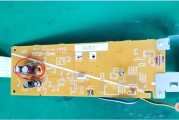
Suitable products: M1005,M1020 Fault Description: The printer does not stop feeding paper. The customer sends and repairs an M1005 printer to start up and does not stop feeding paper. Generally, this situation is mostly related to relays (clutches). as shown in figure 1: red...
M1005 startup newspaper paper path card jam suitable for products: M1005, 1020+Fault description: Startup control panel newspaper paper path card jam processing process 1 Firstly, ensure that there are no paper jams or debris on the paper path that could cause the sensor to malfunction ..
Fault description: M1005 startup cleaning... automatically prints engine page like page. Solution process: 1 At first glance, the fault seemed to be a software malfunction, but even when the standalone machine was turned on, this fault occurred and was resolved by software. 2. Single machine recovery ..
The new machine keeps displaying Permanent storage init when turned on. The USB device cannot be recognized online, and the cold reset is invalid. Solution: 1. Cold reset operation fault or error. 2. The computer connection is not recognized ..
Language: English Format: PDF electronic version, unencrypted Pages: 224 pages. The manual is detailed in content, with illustrations and text, making it a good helper for maintenance personnel. With the maintenance manual, you no longer have to worry about disassembling and troubleshooting this machine! Even though ..