Solution: The machine has been replaced with a new carrier. The steps to adjust the carrier value are as follows: 1. After replacing the carrier, ensure that the extinguishing lamp is installed correctly, install the drum component into the machine, and do not install the carbon powder. 2. After the machine is started, press the menu counter display button ..
1. Severe bottom dust: If the charged stick is not properly assembled, it will cause unstable charging, increase the amount of dust inside the machine, and after being absorbed by the transfer stick, the dust on the transfer stick will become severe. When the back end of the paper touches the transfer stick, the bottom dust on the back end will be more severe ..
Ke Mei 246i,226i,306i,266i cannot be started or the code is C- D072. After a few minutes, the black screen does not respond, crashes and other problems. Maintenance cases, Ricoh copier maintenance...
BizHub 246i, BizHub 226i, BizHub 306i, BizHub 266i Failure Phenomenon: Startup stays at 25% of KM logo progress bar, unable to start normally. Original...
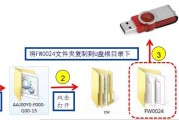
bizhub 306i/266i/246i/226i series 1. Preparation 2. Boot U disk boot 3. Set up upgrade step 1: Prepare 1. Check the current firmware version of the machine: maintenance mode-firmware version, in preparation for upgrade...