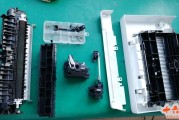
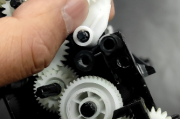
A 5054 machine, the first tray of A4 paper prints and copies normally, and the second tray of A3 paper. Pressing the copy button causes a paper feeding action, followed by a noise. The paper is fed a little and shows a paper jam. The initial diagnosis was that the paper roller was stuck, but the fault persisted after replacement, so it had to be replaced ..
Fault description: The user sent the HP5820 printer for repair. The machine malfunction is printing error E4 and printing paper jam error. The user reported that the machine usually prints a large amount of paper, mostly on photographic paper. Solution process: Based on the fault described by the user, it was found during testing that: ..
Fault Description: Consumer color machines report wrong paper jamming faults. In addition to conventional paper channel dredging and troubleshooting, it is often necessary to further disassemble the paper feeding assembly to thoroughly troubleshoot the fault points. in view of the complexity of the disassembly itself, so many colleagues were discouraged, and into the paper component is...
HP DJ 2029/2529 and DJ 3000 series printers feeding principle and feeding component installation precautions [*] Feeding principle [*] Paper jam after continuous feeding [*] Installation of feeding gear set precautions after continuous feeding ..
The third paper box of the machine shows an A3 paper jam prompt J014 indicating a conveyor sensor. The cardboard box was tested on A4 paper and found to be normal. The A3 paper fault still persists after replacing the paper roller, and it is believed that there is a problem with the paper feeding component. Subsequently, the paper feeding component was replaced and the fault disappeared. . ...