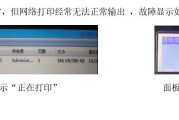
Symptoms: The M2701 machine copies normally, but network printing frequently fails to produce output; the error message is shown in the figure below. Cause: Faulty network cable or motherboard. Repair process: **** Content hidden by author **** ..., Ricoh...
After the printer enters sleep mode, it cannot print; you need to restart it. Method: **** Content hidden by the author ****, Ricoh/Kyocera, Ricoh copier repair...
The printer is not printing; after selecting the print option on the computer, the file does not output properly, and the printer does not display any error messages. 1. Upon inspection, the machine has user code enabled. Open the printer properties page in the PC-side print driver, select “Preferences,” and under “Effective Access ...”