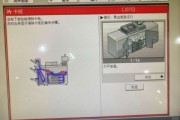
The paper jam code J070 occurred in Ricoh 8300. The reason why the machine frequently jammed the paper jam display code J070 during the 8300 printing process: 1. After arriving at the scene, the paper jam code was first checked according to the 8300 manual...
Symptoms: When the machine continuously copies/prints, there will be a C- position paper jam prompt. The head end of the paper is located at the position of the drum separation claw, and the image position on the paper is seriously offset. The image offset position is not fixed. paper jam when the paper end stop position maintenance...
Symptom The paper jam in the registration position during the printing process of the machine. (Note: Paper jam sometimes causes copy folding failure) Reason 1) The motherboard MPU of the machine is not good. 2) Poor machine alignment roller mechanism and driven wheel. 3) machine alignment sensor...
According to the user's description, one card cannot be scanned, and the card code is J054. Go to the scene and take brand-new paper to test the same problem. The position is at the front of the ADF alignment sensor. Don't go down. No obvious curl was found on the front of the paper. The crease...
Symptom: M2700 printing capacity of 1946 pages, normal single-sided paper output, double-sided paper head entering double-sided paper jam. Reason analysis: Through the analysis of cardboard records, Duplex stay on exit:36。 The machine detects paper ..
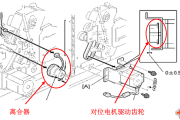
1: Cleaning the alignment sensor and adjusting the gear set of the alignment moving unit, the fault phenomenon still exists. 2: Upon further observation, it was found that the middle plastic gasket of the motor in Figure 1 had been removed in half, resulting in bouncing during rotation and inability to reach the desired speed. The motor needs to be replaced ..