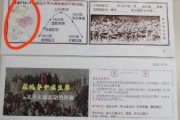
Fault phenomenon: Currently printing/copying with color deviation and slight ghosting, as shown in the figure below (normal output above, color deviation issue below). Suspected use of substitute toner. Processing steps: 1. Automatic color calibration still fails after cleaning the ID sensor. 2. Cleaning image transfer ..
Possible reasons: Setting issues/Laser issues/ICU poor repair process 1. Upon on-site inspection of the fault, the machine experienced the above-mentioned malfunction during PCL6 printing, while other colors were basically normal and printed during green output ..
Analysis process: 1. Using PCL6 driver to change the vector to raster for testing, the image effect did not improve. 2. Using a universal driver test, the phenomenon persists. 3. Select PCL6 Printing Preferences - Detailed Settings - Select Print Quality (...)
Failure phenomenon: the machine is newly installed, and the user responds that the color of C300i printed color documents is obviously not as good as that of C368, believing that the machine is faulty. **** This content has been hidden by the author ****, repair cases, Ricoh copier repairs...