
|
Fault phenomenon: Currently printing/copying with color deviation and slight ghosting, as shown in the picture below (normal output on top, color deviation issue below), suspected use of substitute toner
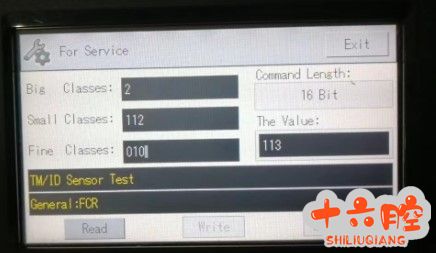
Processing procedure: 1. Automatic color calibration still fails after cleaning the ID sensor 2. Automatic color calibration still fails after cleaning the image transfer belt 3. SP2-111-4 failed to execute automatic line position adjustment 4. SP2-112-001 (Perform ID sensor check) Check the SP2-112-010 values as follows: If the result is "111", it is normal If the result is "2xx", "x2x" or "xx2", then Vsg adjustment fails If the result is "3xx", "x3x" or "xx3", it is likely that there are dirt or scratches on the belt, or the belt is irregular If the result is "5xx", "6xx", "7xx", "8xx", "x5x", "x6x", "x7x", "x8x", "xx5", "xx6", "xx7" or "xx8", there is a high possibility of dirt or curling on the belt. The value of machine 2-112-010 in this case is 113 (as shown in the figure below)
Upon rechecking the ITB belt, scratches were found Solution: The scratches on the ITB are not very serious, at least they do not affect other copying or printing effects except for color deviation. Therefore, use SP3050 to force powder once and visually check that the color tends to be normal before executing SP3030 to initialize the TD sensor. After completing the above two codes, the automatic color adjustment in the user tool can pass normally. The printing/copying effect is normal. |
Address of this article:https://073868.com/post/244.html
Copyright Notice:
For relevant infringements, reports, complaints and suggestions, please send E-mail:weixiuwang68@qq.com
Tags: #Color cast #Double image #C2000 #TD sensor #Mandatory powder addition






