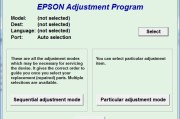
Epson Printer Reset Software is a computer printer management software that solves problems when EPSON printer ink cartridges are updated or the waste ink counter is not running correctly. It is an official product and is applicable to all series of printers. Software Introduction Love ..
toner cartridge reset method: (prompts to replace the cartridge) close the front cover. Make sure the device is powered on. Press wrench (setting). If all settings are displayed on the home screen of your device, skip the settings menu. Press all settings. (Some models.....
Brother MFC-L2700d toner clearing method (prompt to replace toner replace "or" replace toner cartridge):1. open the front cover of the printer (but there is no need to take out the toner cartridge inside) 2. long press the function key (m...
MFC7360 and DCP7060D supplies are TN2225/DR2250, but the zero method is not the same! MFC-7360 toner reset: 1. Open the front cover; 2. Press the clear key to show...
Toshiba 240S clear: turn on-open the front cover of the printer-clear-start (no display on the LCD screen)-up key (the LCD screen displays the number 01)-continue to press the up key (the LCD screen displays 11)-press o...
Brother HL-3150CDN/3140/3170CDW Color Laser Printer Powder Clearing Method Steps (Powder Model TN221/265/281/285):1. At the same time when the top cover unit is open...
Brother, after adding powder to the TN-B020 cartridge or replacing a new cartridge, it also indicates that the toner is insufficient or exhausted, and the cartridge needs to be cleared!!! 1. cartridge reset in one machine operation reset:(DCP-B7535DW/...
HP hp 136a/w/nw printer chipless toner cartridge FAQ: 1: Install the toner cartridge: the chip is not installed, one of the chips has 4 contacts, and the largest contact can be solved close to the buckle. 2: toner shortage: because of the old chip...
Brother 2535/2550/7090/7190 or Xerox 248 series reset method, hard goods came today: PS knowledge: brother DCP-L2535DW and DCP-L2550DW were originally...
1. Minolta 2600P printer toner cartridge clearing method (prompt toner exhaustion or toner cartridge replacement) A. Turn off the printer power and open the front cover; B, press and hold the [GO] key while turning on the power supply, check the cartridge, toner cartridge and paper indicator lights...