|
SSC Service Utility It is a computer printer management software that solves problems when EPSON printer ink cartridges are updated or the waste ink counter is not running correctly. It is an official product and is applicable to all series of printers. Software IntroductionEpson Printer Reset Software is an Epson printer reset tool officially launched by Epson, which helps users reset printer data and extend the lifespan of components. This printer reset software can reset multiple models of printers. The software is easy to operate and comes with detailed user tutorials. Simply follow the instructions step by step to complete the operation, which is very convenient. In addition, the software can automatically read the value of the computer's waste ink counter and the printer model, saving users manual operation time and improving work efficiency. The printer reset software is used to reset data and has no effect on the actual waste ink collected in the pad. But if the count is not reset to full, the printer will prompt that the component has reached its expiration date and cannot be printed. After resetting, the count can be reset and the printer can be used normally. Software features
1. Resetter This function is dedicated to refreshing ink cartridge chips. EPSON printers are equipped with an ink counting chip to prevent ink cartridge filling. Software can directly operate chips and support most machines. A few machines require the use of ink freezing function and some special methods to refresh their chips. 3. Ink monitoring window Includes four functions: bar chart printer reports ink consumption refresh Bar chart: displays the current remaining ink capacity in normal mode Monitoring type: Ink consumption: In normal mode, it displays the remaining ink capacity for each color. This function can display the remaining ink capacity of all EPSON printers installed in the system. Printer report: displays the ink consumption for each color from the time the printer is turned on to the completion of a printing task. Even if this program is not running when the printer is turned on, it can still be displayed after the printing task is completed. Refresh: Refresh monitoring type data. 4. Select the printer for system installation Printer model: Select the type corresponding to the printer installed in the system. (The printer in this option is a printer supported by this software) Note: The software will remember all your settings, so you don't need to reset them the next time you start. Close the main window, and the software will exist in the system tray in a minimized manner. Software Features
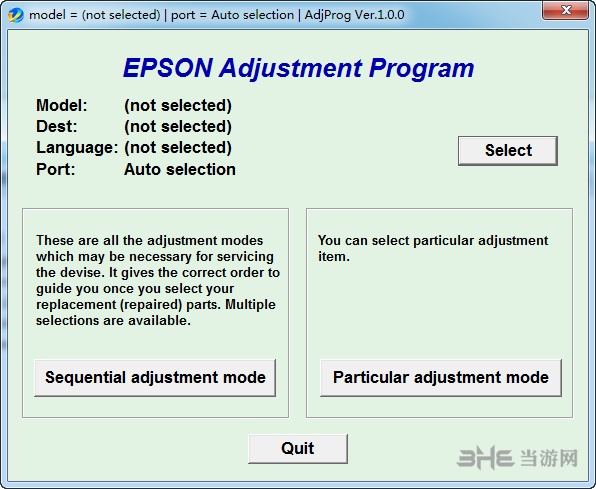
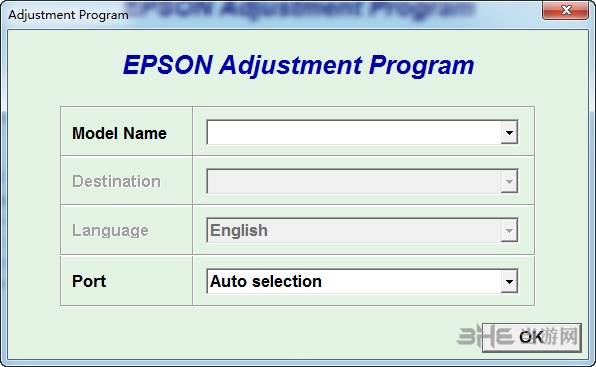
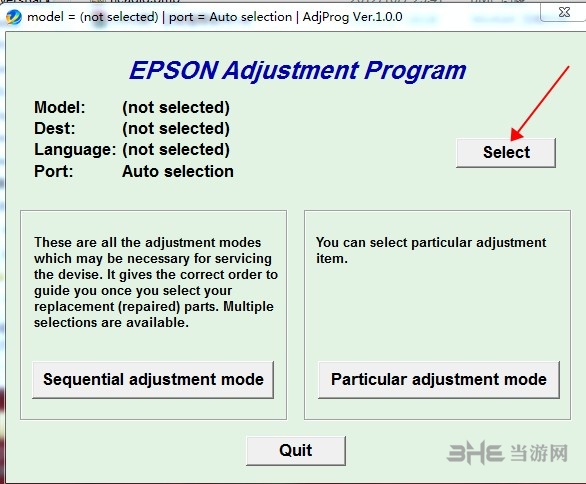
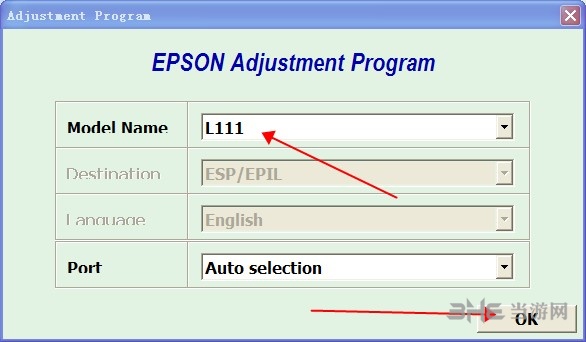
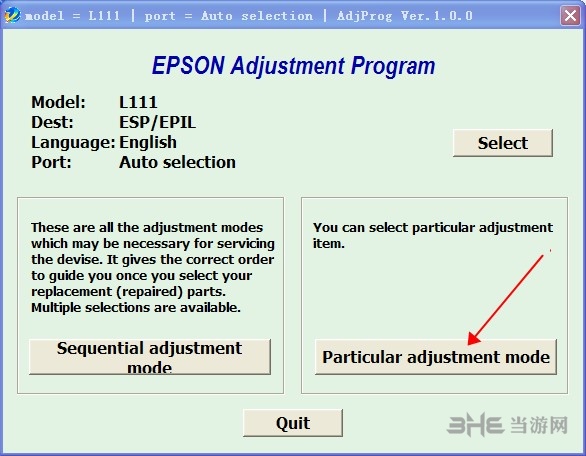
1. Comes with an operation tutorial to help users quickly get started. 2. Support resetting L800 and L801 printers. 3. Can solve the ink consumption problem of printers. 4. The software does not require installation and can be downloaded for use. 5. Capable of automatically reading the value of the computer waste ink counter. 6. Capable of automatically reading the printer model connected to the computer Tutorial illustrationsEpson printer reset software can bring your printer back to life, but the various settings of the printer are very complex. A slight mistake in operation can cause driver loss, inability to recognize, and incorrect printing. Therefore, when you want to perform professional reset work, you must operate correctly at every step. Below is a tutorial on using Epson reset software, which will make it easy for you to get started: 1. Firstly, we download the reset software and then open and double-click adjprog.exe to run the program; 2. Click on select settings, choose your L111 printer, and then click OK to confirm;
3. Click on the Partial Adjustment mode to enter the function menu and reset it to zero;
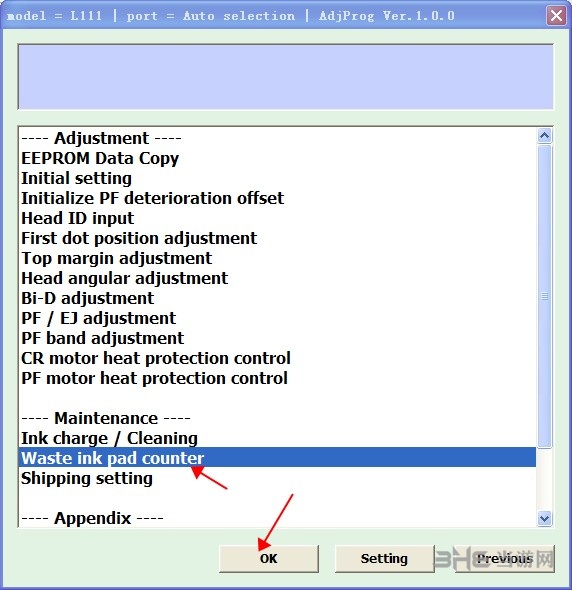
4. Select the Waste ink pad countedr to reset the waste ink counter, and then click OK to enter the reset mode;
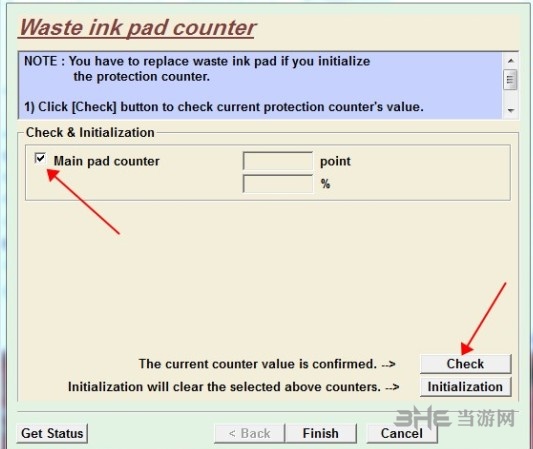
5. Click Check to reset the waste ink counter and check the waste ink value;
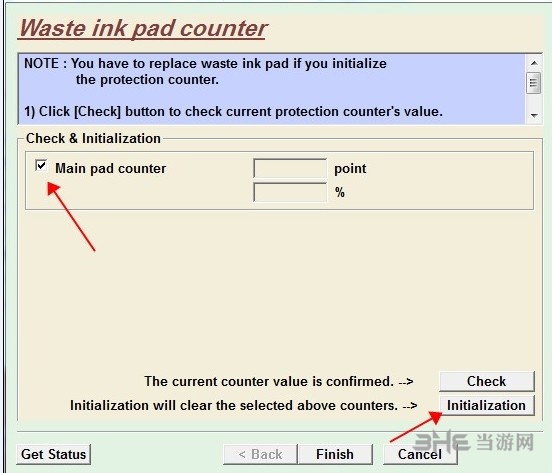
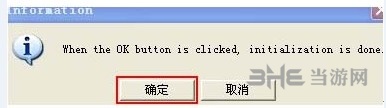
6. Let's reset the waste ink counter by checking the box and clicking Initialize;
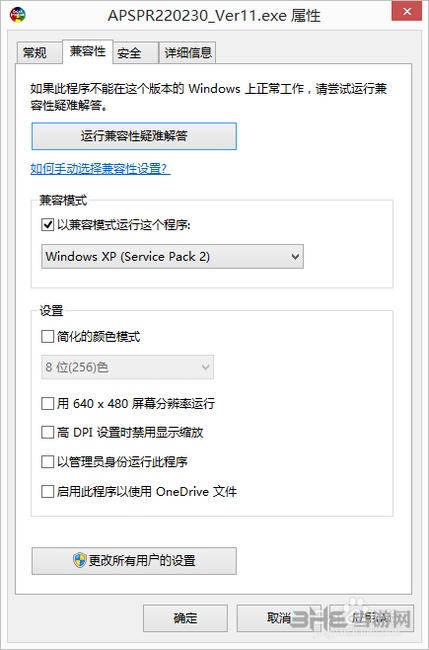
7. Really cleared, your printer has been reset; Turn off the printer and restart it, then you can continue working. Error codeSome users have encountered an error message of 2100012c when opening or using the Epson reset software. As a result, many users are unable to open the tool. The reason for this problem is very simple, because Epson printer reset software can only be perfectly used in XP, so we only need to use compatibility mode to solve it: As shown in the figure, right-click on the executable file of the reset software, select Properties, choose "Compatibility" in the pop-up dialog box, check "Run this program in compatibility mode" and select Windows XP mode below it, then select the application, click OK, double-click the reset software again, and it will open normally.
1. The printer must be powered on, otherwise the software cannot find the printer. 2. Poor connection of printer data cable. Turn off the printer, unplug the data cable, and reconnect. Or replace the USB interface, or replace the data cable. After connecting properly, reopen the printer. 3. The printer does not recognize ink cartridges. Remove the ink cartridge and reconnect it. The ink cartridge must be installed in place. 4. Software error. There are many fake software online, and the printers found are not supported by the software. The software believes that it is not connected to the specified printer. Using legitimate software can solve this problem. |
EPSON Waste Ink Clearing Software
309
0