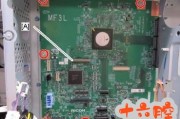
Fault phenomenon 1: SC672-00. Exclusion plan: 1. Check the controller version signal lights, all controller version signal lights are on. 2. When unplugging the hard drive and turning on the computer, all signal lights on the controller board will be on. 3. Reinstall the controller board and ensure that the power on signal light is fully on ..
symptoms a Ricoh MC2000 print test page light. Possible reasons: PCDU problem/LDU problem/BICU problem/chip problem maintenance process 1. Check the failure situation on site, the machine has been used for a period of time,...
Symptom: MC2000 cannot detect black toner when turned on, other colors are normal. Analysis process: 1. Reinstall the black toner bottle and clean the toner detection chip, but it cannot be cleared after reinstallation. 2. Test after replacing the black toner bottle with a new one ..
Symptoms After replacing the machine chip, it was found that only the original could be scanned from the platen when copying, and the document feeder could not work normally. Maintenance process 1. Because of the failure after replacing the chip, it is suspected that the machine model is not set correctly and the machine does not recognize the document feeder, ....
Code explanation channel error, and sometimes the machine may have issues with correctly installing the drum unit. Subsequently, the black drum TD cable was unplugged and reconnected, and the black powder chip was cleaned before starting up normally. This fault is caused by poor connection of the chip. . .. Ricoh/ ..
Symptoms M2701 shows ready after starting up, but the start key has been red and does not turn green, copying and printing cannot be used, and the fixing unit is preheated. reason 1. operating panel fault 2. firmware problem 3. power board fault 4. chip so...
Ricoh MC2001 prompts shutdown in English after startup. Reason: 1. Poor chip. 2 Motherboard malfunction 3 Controller board fault measures: 1. Replace the chip, but the fault persists; 2. Plug and unplug all wiring harnesses, but the fault persists ..
HP Laser Single Function Printer P11061108 Replacement Interface Board Follow up Operation Details: New motherboard flashing tool 1) Connect the printer to the computer through the USB interface and install the driver program. The computer should recognize the printer model as P11
Symptoms The machine often crashes after starting. Restart the machine for normal use. (Note: The crash phenomenon will cause failures when starting the machine and saving energy after using the machine) Reason 1) The machine motherboard BICU is not good. 2) machine chip EEPROM...
HP hp 136a/w/nw printer chipless toner cartridge FAQ: 1: Install the toner cartridge: the chip is not installed, one of the chips has 4 contacts, and the largest contact can be solved close to the buckle. 2: toner shortage: because of the old chip...