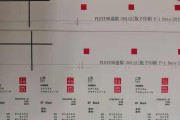
Fault description: Printing copies with default driver settings may result in poor transitions, especially in areas with light colored blocks where bars appear. Reason for malfunction: In the default settings, the screen is set to Screen 1 (point 190), and the transition color block files are mostly graphics, with point 190 parsing the image ..
Fault description: The cutting line position on the 400 gsm composite paper frequently jumps during printing. Cause of the fault: Variations in the paper bonding position result in shifts in the imaging position detected based on the paper edges. Solution: Re-execute the centering adjustment and turn off the centering detection (....
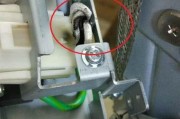
Fault description: The customer reported that the machine suddenly tripped during printing, causing the leakage switches in the entire store to trip. After turning on the store's power switch, the machine cannot start up normally. The startup screen is black and there are no power indicator lights. Upon inspection, it was found that the customer only needs to turn on the leakage switch of the host ..
Fault description: A newly installed 3080 graphics card causes the screen to remain black upon booting. The power indicator is normal, and printing functions are working properly. Sometimes the screen takes up to an hour to light up, while other times it fails to turn on even after a prolonged wait. Replacing OACB, screen, screen wiring does not work...
Fault description: The host cannot complete preheating and cannot enter printing mode when turned on. The main interface of the machine keeps showing that it is warming up. Accompanied by occasional error C3509. Reason for malfunction: * * * * This content has been hidden by the author * * * ..,. ..
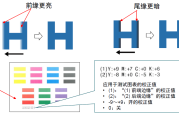
Function [*] Image processing will darken the image density at the leading edge of color patches. [*]Image processing will brighten the image density at the trailing edge of color patches. usage * * * * this content is hidden by the author * * * * ..., maintenance case, Ricoh copier...
Usage: Perform this adjustment when paper wrinkles appear on the trailing edge of the back when printing on both sides. When printing on both sides of thin paper (135g/m2 or less), the back trailing edge is the most prone to paper wrinkles. method: * * * * this content is hidden by the author...
Fault description: normal startup, no paper jam on one side and no paper jam on both sides. Face down display card J7555. Cause of failure: after testing, it is found that the RU510 cannot reset normally after using the face-down function, and it will be played next time...
Fault description: The printed part has black streaks. Cause of failure: The plastic blade beside the toner guide roller in the transfer scraper assembly is damaged (the red part in the figure is damaged), and the toner roller cannot form a toner belt on the transfer belt, resulting in no lubrication between the transfer belt scraper and the transfer belt....
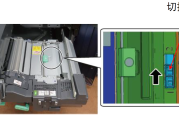
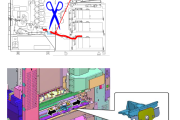
This mechanism is implemented in version 1.0 hosts, but is not used. (Because banner paper was not supported at the time.) The banner paper cutter is locked by the locking screw. (In version 2.0 and later, the locking screw has been removed during installation.) uses: cutting card...