
|
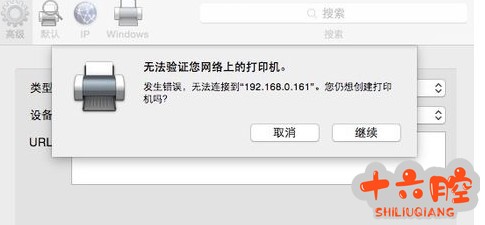
Ricoh MP2555SP Series Apple System Printing Issues MP_2555SP_3055SP_3555SP_4055SP_5055SP_6055SP Symptoms 1. The new machine is installed normally, but after using it for a few days, it cannot print. When reinstalling the driver, the MAC system prompts that the driver is invalid for verificationThe body is shown in the following figure:
Possible causes: Network abnormalities, machine hardware damage, MAC system configuration issues Maintenance process 1. Print the NIB report for SP5-990-007 and check if the IPV4 address matches the IP address recognized by NVRAM (confirmed to be normal); 2. Confirm that both Ipsec and IEEE801. X protocols are closed; 3. Test that the ping command can be connected to the MFP to eliminate network P TO P connectivity issues; 4. Reinstall the driver under MAC (select the Apple logo on the default interface of MAC - choose "System Preferences" - select "Printers and Scanners" - click "+" to search for network devices - select "MP2555" - when adding a printer, do not select "Standard TCP/IP Protocol" and change the protocol to "HP jetdirct socket". After that, the MAC system will no longer prompt the above error (unable to verify network printers); 5. The printing test is normal; Solution The malfunction was caused by an error in the printing protocol, which was fixed after changing the printing protocol; |
Address of this article:https://073868.com/post/5757.html
Copyright Notice:
For relevant infringements, reports, complaints and suggestions, please send E-mail:weixiuwang68@qq.com






