
|
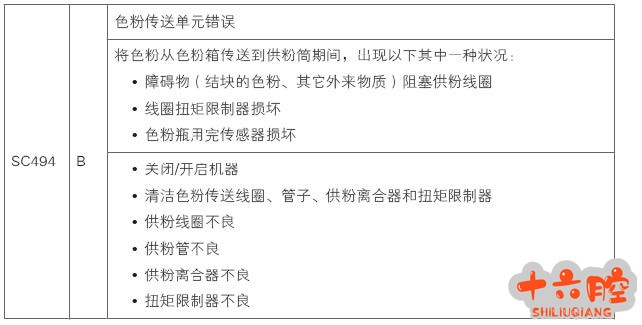
Ricoh 1357 printing prompts internal function problem code SC494 1350906110690711071357 series When copying/printing, the panel prompts "There is an internal functional issue, restarting...". After turning on and off the machine again, the fault disappears. However, when performing a small number of copying/printing tasks, this fault phenomenon will occur again. According to SP7403, SC history shows that SC494 has appeared. Reason Not performing the toner discharge operation during the transportation of the host resulted in the deposition of toner in the toner box, thereby blocking the toner supply pipeline of the toner box. Refer to the maintenance manual, the SC494 code description is as follows:
According to the above prompts, it is necessary to check the toner conveying coil, tube, powder supply clutch, and torque limiter Solution Perform powder removal operation: Refer to Chapter 1 of the maintenance manual for the installation of the internal host and the transportation host section. Before moving the host
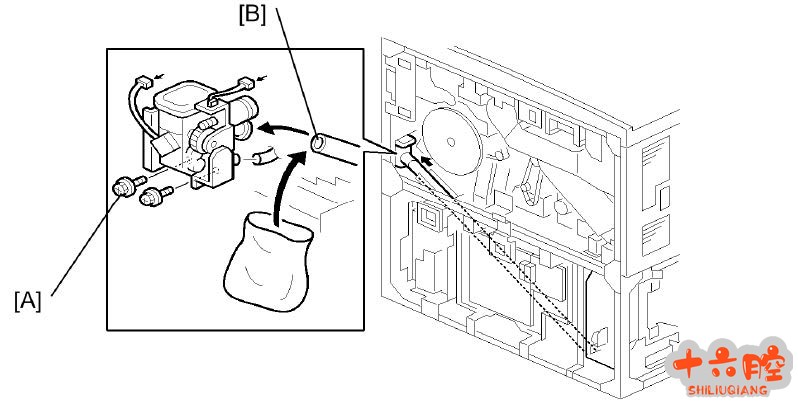
1. Use SP5804-41 (toner bottle) and SP5804-42 (lower toner bottle) to close the toner cap. 2. Turn off the operation switch. If the main power switch is turned off, the toner bottle cannot be removed. 3. Then remove the toner bottle from the toner box. 4. Remove the rear cover plate. 5. Open the PSU box and controller box (do not remove!). 6. Remove the left upper cover plate, left lower cover plate, and right upper cover plate. 7. Remove the two screws [A] that fix the powder supply cylinder. 8. Cover the end of the toner transfer coil [B] with a plastic bag. 9. Turn on the operation switch. 10. Execute SP5804-38 and SP5804-39 to activate the toner box motor and supply coil clutch for 2 minutes and remove all toner from the supply hose. 11. Reinstall all removed components, except for the toner bottle. When returning to its original position, make sure to connect the three pipes to the powder supply cylinder. 13. If the sensor for detecting toner in the left toner box is damaged, SC494 code may also appear. If there is a problem with the powder supply rod that cannot remove the toner, SC494 code may also appear. Step by step, eliminate it. After performing the powder discharge operation, continuously copy approximately 500-1000 high coverage copies, consume the toner in the toner box, and allow the deposited toner to pass through the powder discharge operation and copy consumption, completing the unblocking of the powder supply pipeline in the toner box. Be sure to follow the operation steps in the "Moving the Host" section of the maintenance manual before moving the host! To avoid the occurrence of fault codes orDamaged host! |
Address of this article:https://073868.com/post/373.html
Copyright Notice:
For relevant infringements, reports, complaints and suggestions, please send E-mail:weixiuwang68@qq.com







