
|
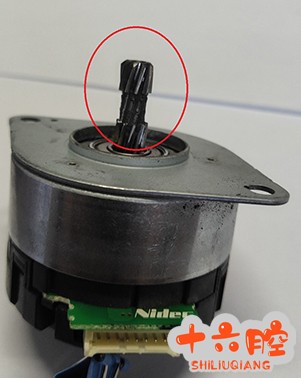
MP_2555SP_3055SP_3555SP_4055SP_5055SP_6055SP Symptoms: The second paper box is fed with paper jam, and when the paper is rubbed by the rubbing wheel, it prompts for paper jam. Maintenance process: 1. Tested using the first paper box and the manual paper feeding table, the paper can be fed normally without any paper jams. Can troubleshoot the position fault. 2. Take out the first paper box and observe the paper lifting action, which is normal. 3. After pressing the copy button, observe the action of the paper roller. The paper roller does not rotate, but you can hear the paper feeding motor rotating and accompanied by abnormal noise. 4. Use output inspection to test the paper supply motors of the first and second paper paths, and the motors are running normally. 5. Disassemble and inspect the paper feeding motor, and it was found that the motor drive shaft has been worn (see the figure below). The gears in contact with it are intact. After replacing the feed motor, no paper jam was found during continuous copying tests.
Solution: Replace the second paper feed motor and solve the problem. |
Address of this article:https://073868.com/post/5760.html
Copyright Notice:
For relevant infringements, reports, complaints and suggestions, please send E-mail:weixiuwang68@qq.com
Tags: #Cardboard box #Paper jam #2555 #3055 #3555







