
|
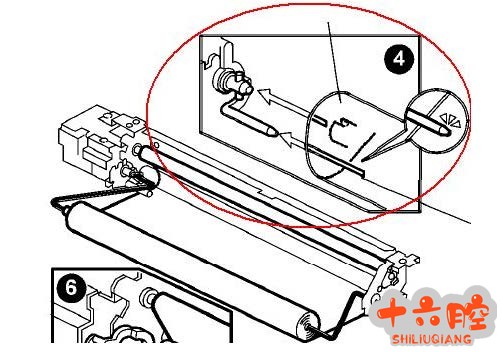
Fault: The MFP displays "Replace fixing and cleaning unit". Reason 1. Fixing and cleaning unit. 2. The fixing and cleaning net has used up the sensor. 3. Fixing and cleaning net detection lever. 4. Fixing unit. Maintenance process 1. Check the fixing and cleaning unit, with at least half of the cleaning net remaining, to eliminate errors caused by the use of the cleaning net; 2. Adjusting SP1902-001 (used area of fixing and cleaning net) to "1" can eliminate the error message, but it will soon report the error again. Resetting the fixing and cleaning parts in SP7622, as well as resetting the fixing and cleaning unit in the PM option in SP, are all ineffective, ruling out data errors that may have caused the error; 3. Remove the cleaning net and check the contact rod. The installation is correct and there is no damage;
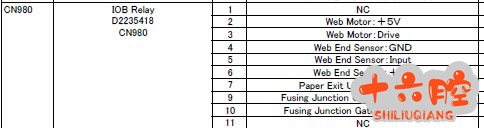
4. Use bit 7 of SP5803-027 to detect that the cleaning net is not responding after use, and use SP5804-055 to test that the cleaning net motor is not responding. Suspect that the communication is causing the malfunction; 5. Using a multimeter to test the wiring harness connections from CN980 on IOB to the fixing cleaning net motor and the sensor after the cleaning net is used up, it was found that there is no conductivity.
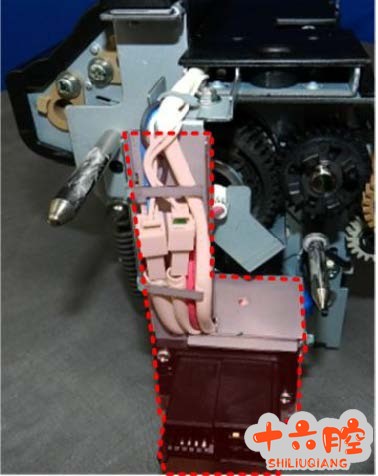
6. Afterwards, the communication between the wiring harness and the fixing cleaning unit was checked segment by segment, and it was ultimately confirmed that the communication failure was caused by the socket between the fixing unit and the host. After replacement, the fault was resolved.
Troubleshooting after replacing the socket of the fixing unit |
Address of this article:https://073868.com/post/5729.html
Copyright Notice:
For relevant infringements, reports, complaints and suggestions, please send E-mail:weixiuwang68@qq.com
Tags: #Cleaning unit #Fixing #Cleaning paper #7502 #9002






