
|
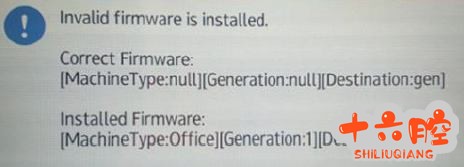
Ricoh IM C2000 Series Startup with Invalid Firmware Invalid firmware is installed
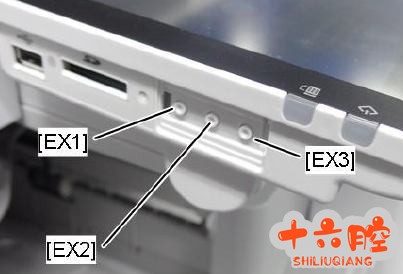
Reason: program disorder Maintenance process: 1. Turn off the main power switch, and then unplug the power cord from the socket. 2. Press the machine’s main power button. The blue LED (upper right corner) on the operator panel will light up for a while. 3. Plug the power cord into the socket. The above 3 points ensure that the screen restarts 4. Press and hold the [EX1] and [EX3] keys while pressing the main power button. This will allow you to enter recovery mode.
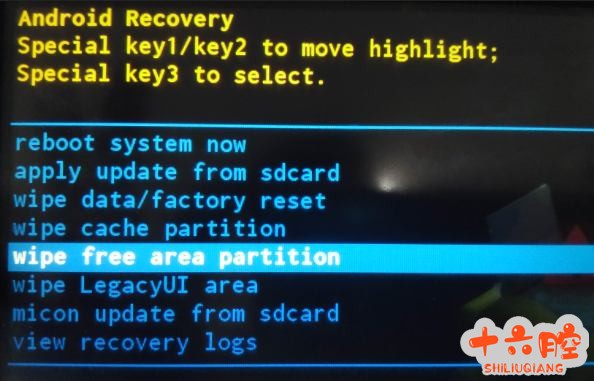
5. When the blue screen is displayed, press and hold the [EX1] and [EX2] keys for 4 seconds. 6. After entering recovery mode Press the [EX2] key 4 times, move the cursor to the "Wipe free area partition", and then press the [EX3] key to perform the erase of the free area partition.
7. Once the message "Free area partition wipe complete" is displayed in the lower left corner of the LCD, move the cursor to "Reboot system now", and then press the [EX3] key to restart. |
Address of this article:https://073868.com/post/5644.html
Copyright Notice:
For relevant infringements, reports, complaints and suggestions, please send E-mail:weixiuwang68@qq.com
Tags: #Firmware #Firmware Error #2000 #installed #Ricoh






