
|
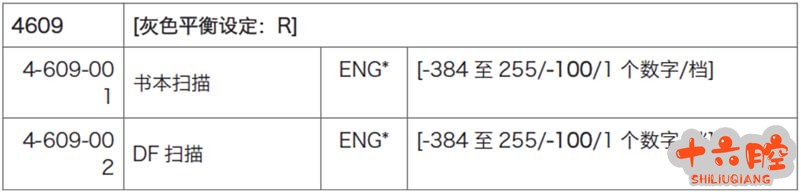
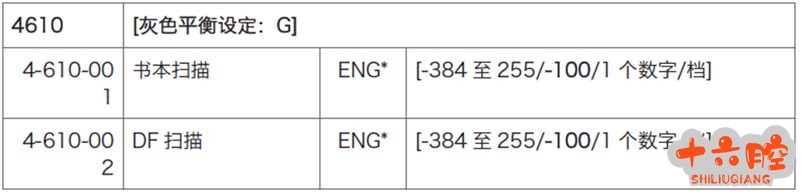
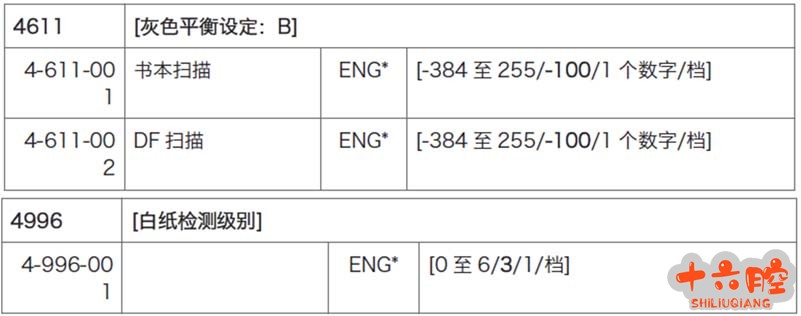
Symptoms Fault: MP7503 scanning has bottom dust. Maintenance process 1. Test the printing counter page, online printing, and copying separately, all of which are normal, ruling out the possibility of machine printing engine failure. 2. Continue to clean the glass of the scanning draft table and scan the white level detection whiteboard, and the test fault persists. 3. Using the non default SMC report of SP5990-006, compared with the machine's random SMC report, no abnormal scanning parameters were found in SP4.4. Check the maintenance manual and adjust the default value of "-100" for the R, G, and B gray balance data of SP4609, 4610, and 4610 to "0". The test results have improved, and continue to adjust the parameters. The test copy has started to fade. Continuing to change the SP4996 white paper detection level from the default value of "3" to "1", the testing scanning, copying, and printing were all normal, and the fault was resolved.
Solution After changing the values of SP4609~4611 to 0 and SP4996 to 1, the fault was resolved. Note: This data is only used for this case, and specific parameters are subject to actual test results. |
Address of this article:https://073868.com/post/5631.html
Copyright Notice:
For relevant infringements, reports, complaints and suggestions, please send E-mail:weixiuwang68@qq.com
Tags: #7503 #Scan #bottom ash







