
|
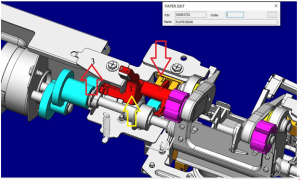
MPC3004exSP/3504exSP/4504exSP/6004exSP,IM C2000/C2500/C3000/C3500/C4500/C5500/C6000 Symptoms:When the machine is turned on, it displays R1-R5 paper jam. After reopening the front door, the machine still malfunctions and displays SC720-35. Analysis:R1-R5 are paper jams that appear on the upper straight through paper path and stacked paper path. SC720-35 rear pressure plate motor error. According to the manual and 3D parts manual, Figure 1 shows the pressure plate, and the pressure plate and stacking paper wheel work in sequence. Sensor 2 did not detect the position of the pressure plate, and the reverse sponge wheel did not rotate. Through observation, it was found that the pressure plate could not trigger the in-situ detection sensor normally. Upon inspection, it was discovered that the pressure plate bracket in Figure 3 was deformed
Measures:After correcting the pressure plate bracket, the pressure plate can be reset normally and trigger the sensor, and the fault can be eliminated. |
Address of this article:https://073868.com/post/5470.html
Copyright Notice:
For relevant infringements, reports, complaints and suggestions, please send E-mail:weixiuwang68@qq.com






