
|
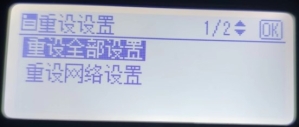
Symptoms: The first print output time is long, taking 1-2 minutes. Maintenance process: 1. On site testing requires about 1 minute and 30 seconds for the first printed output, and the machine will run idle for a long time after receiving the command before outputting the job; 2. Using the built-in computer network cable for direct connection testing, there was no significant improvement in printing speed, ruling out customer computer and network issues; 3. Printing the black and white configuration page in the user tool also takes more than 1 minute to output. It is determined that the problem is not related to the computer or network. Considering that this machine has only used more than 400 sheets and the probability of drum component failure is not high, it is suspected that the fixing heating is delayed or the machine self-test time is long; 4. Inspect and clean the fixing unit, thermistor, and ID sensor separately, and re adjust the wire position until the problem persists; 5. Execute the 'Reset All Settings' option in the user tool, and increase the printing speed to around 1 minute, but still cannot meet the customer's needs;
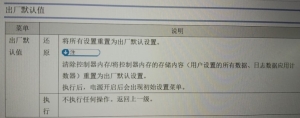
6. After resetting the factory default settings in the maintenance mode, the printing speed of the configuration page was increased to 15 seconds, and the printing speed on the test computer also reached about 15 seconds. The customer accepted this effect.
|
Address of this article:https://073868.com/post/5464.html
Copyright Notice:
For relevant infringements, reports, complaints and suggestions, please send E-mail:weixiuwang68@qq.com
Tags: #C300W #C250FWB #Long printing time #Fixing Unit #Thermistor






