
|
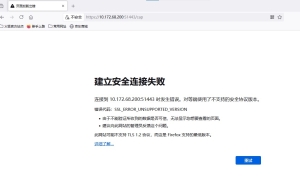
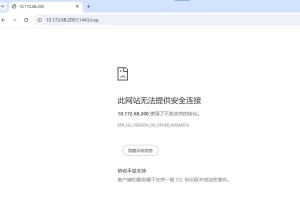
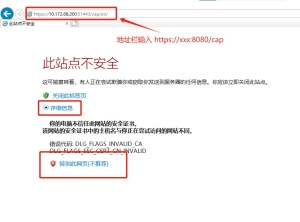
Fault phenomenon:After installing the Greenland software, MP C3503 can enter the machine web page and ELP backend normally. Attempt to input in the address bar https://XXX : 8080/cap or http://XXX:8080/cap I tried three browsers, Microsoft Edge, Chronome, and Firefox, but still couldn't access them. The machine firmware version was Ver.32.00, and the installation tool was RemoteInstallManagerial sv_V185. The computer is running on the Win10 system. The fault diagram is as follows Microsoft Edge Browser
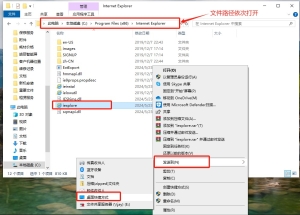
Solution: Use Internet Explorer browser to access the software backend webpage. Step 1: Open the computer path C: \ Program Files (x86) \ Internet Explorer, and create a desktop shortcut for the iexplore program.
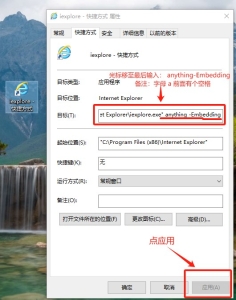
Step 2: Right click on the iexplore shortcut, open the properties, modify the target, move the cursor to the end, enter anything Embedding, with a space before the letter a.
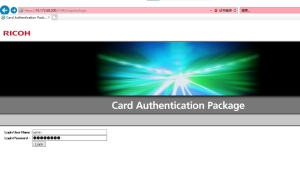
Step 3: Open the desktop iexplore shortcut, enter in the Internet Explorer browser address bar: https://XXX:8080/cap Click on 'Details' and go to this webpage (not recommended).
Step 4: Account admin, password password, log in.
|
Address of this article:https://073868.com/post/5624.html
Copyright Notice:
For relevant infringements, reports, complaints and suggestions, please send E-mail:weixiuwang68@qq.com
Tags: #C3503 #Greenland #Win10 system #c6003







