
|
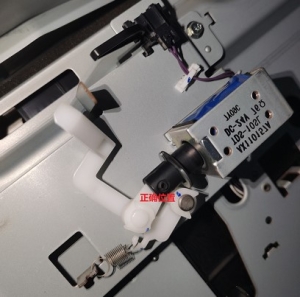
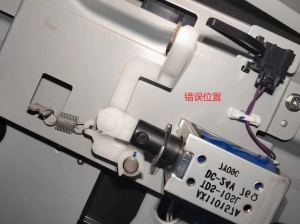
Symptoms: The cascading paper box (LCT) prompts that the paper box should be set correctly. Pull out the cascading paper box (LCT) with paper on the left and no paper on the right. The prompt disappears when the paper is placed on the right side, but it appears again when the paper on the right side is used up. Analysis: When the paper in the right tray is used up, if the paper is placed in the left tray, the electromagnetic coil [A] behind the end guard will be attracted, and the rear end guard [C] will be opened. When the rear end panel [C] is opened, the paper moves from the left tray to the right tray. When the rear end panel [C] is fully opened, the rear panel returns to sensor [B] and closes (interrupts). Then, after the paper is moved to the right tray, the electromagnetic coil [A] behind the end board is closed to close the rear end board [C]. The rear bumper return sensor [B] detects whether the rear end bumper [C] is open or closed. If the rear end panel [C] is not closed, the operation panel will inform the user to correctly place the paper in the paper tray.
Through inspection of the end panel action mechanism, it was found that the action lever was in the wrong position. When the electromagnet was engaged, the end panel could not be opened, and the sensor could not detect the opening of the panel. As a result, the left paper box would not proceed with the paper pushing sequence. Measures: Adjust the end fence action lever to the correct position, push it into the LCT, and successfully complete the paper pushing without any further prompts from the machine. Solution: Adjust the end fence action lever to the correct position and eliminate the fault prompt. Note: The end panel control mechanism of the Martini model and Charis model LCT is different. |
Address of this article:https://073868.com/post/5463.html
Copyright Notice:
For relevant infringements, reports, complaints and suggestions, please send E-mail:weixiuwang68@qq.com
Tags: #LCT #Correctly set the paper #C8000 #C6500 #Clutch







