
|
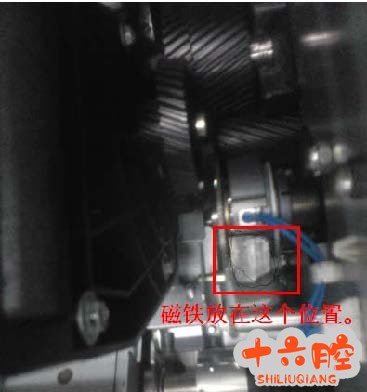
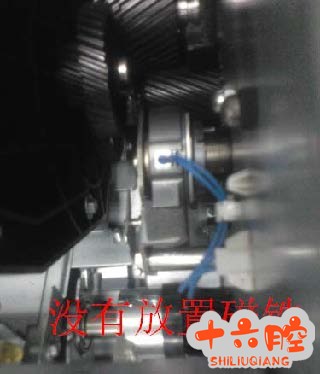
Overview This TI tells you that field experience shows how to solve the problem of suddenly lightened copies during printing (copying) and then continuous white paper. Content Several cases show that during the printing (copying) process, the copy will suddenly become lighter, and then the problem of white paper will continue. On some machines, this problem is intermittent and not easy to catch. After shutting down and restarting, or stopping printing, submit the print (copy) job again, and the problem disappears. When the white paper is continuously produced, the magnetic roller is observed and it is found that the magnetic roller does not rotate, which is the main problem causing the copy of the white paper. Inspection found that the development clutch (PL3.1 Item8) attraction force is not enough to cause the magnetic roller does not rotate. Solution Since there is no separate part number of the developing clutch, the problem can only be solved after replacement by ordering the upper component of the developing clutch, the main motor component (PL3.1 Item1 PN: 127K 52441). We have notified the warehouse to increase the stock of motor components to cope with the problem on site. Once it is found that there is no problem of parts replacement, you can take the following temporary method to deal with it. As shown in the figure below, add a magnet to the position of the clutch to increase the attraction force of the clutch. Here is a photo without the magnet:
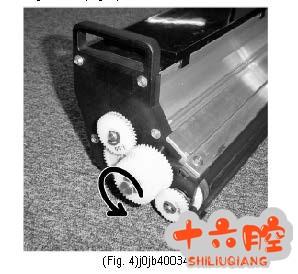
Prevention: The resistance of the magnetic roller rotation is too large, which may be the cause of insufficient clutch suction. In order to minimize the resistance of the developing transmission, please check the following places: 1. Do not have too much toner in the developing chamber. When the machine prompts to add toner, add another toner; 2. When the machine is installed, only one toner is added; 3. As shown in the figure below, manually rotate the developing drive gear to ensure smooth rotation of the gear. If the rotating force is too large, you need to clean and reinstall the magnetic roller blade. Please refer to Chapter 4 of the maintenance manual for installation steps. 4.2.2。
|
Address of this article:https://073868.com/post/4801.html
Copyright Notice:
For relevant infringements, reports, complaints and suggestions, please send E-mail:weixiuwang68@qq.com







