
|
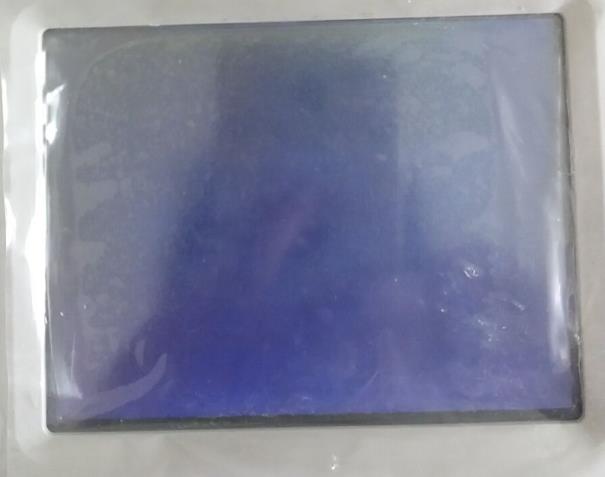
[Symptom]: When the machine automatically hibernates and clicks the power button to start, the LCD screen has a blue screen failure, as shown in the following figure:
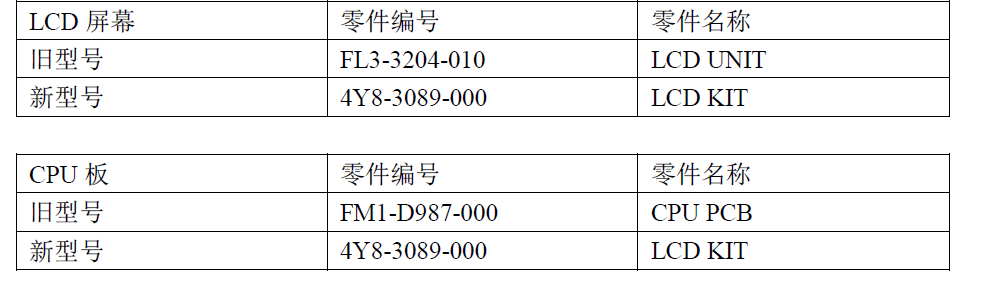
[Cause of failure]]: Due to incompatibility between the system firmware of the machine and the operation panel of the new model (FM1-F286) under certain conditions. [Cause of failure]]: After the problem occurs, replace the operator panel on site and upgrade the M-CON to v83.01 and above. [REPAIR PARTS]]: After the above-mentioned faults occur on the current site, the following three parts can be replaced: Part Name Part Number LCD UNIT KIT 4Y8-3089-000 CONTROL PANEL ASSEMBLY A FM3-9355-000 CONTROL PANEL ASSEMBLY B FM1-F286-000 Note: 1. According to the information provided by SPC, TYPE A panel FM3-9355-0000 has been changed to FM3-9355-010. The FM3-9355-010 and FM1-F286-000 are the same except for the difference of English letters on the panel. 2. LCD UNIT KIT parts include "LCD UNIT" and' CPU PCB'. If the new operation panel on site fails, if you do not want to replace the entire operation panel assembly, but only want to replace LCD UNIT, you must order LCD UNIT KIT(4Y8-3089). If you order LCD UNIT(FL3-3204-010) or FM1-D987(CPU PCB) in the parts manual, incompatibility will occur. The corresponding relationship is as follows:
|
Address of this article:https://073868.com/post/2434.html
Copyright Notice:
For relevant infringements, reports, complaints and suggestions, please send E-mail:weixiuwang68@qq.com
Tags: #2520i #Splash screen #Firmware #Canon







