
|
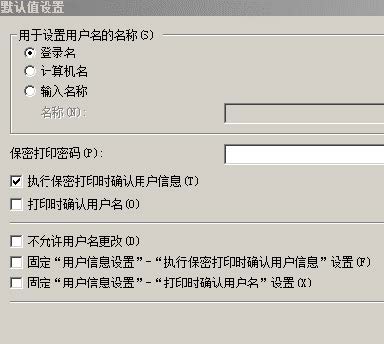
Canon iR-ADV C3325 installation of intelligent control 3.0 some PC can not achieve printout [Failure Analysis]]: 2. The user is a multinational airline, IT is outsourced, PC is a genuine operating system, the old PC operating system is XP, and the new PC is win7 32-bit with domain; 3. The users registered in the intelligent control system are unified in the form of job number plus password, and the PC side is set as the login name method. (It is suggested to change to the "Enter Name" method, but the maintenance station said that users who need to log in should use their own job number to print because they are not used by special personnel.) 4. PC that cannot print out, operating system has XP and win7. maintenance process] 5. On-site inspection found that although users have domains, not all PCs will join the domain. 6. Users who log in locally with job numbers can use "login name" to print out; For users who log in to the domain with job numbers, the print job will have a domain name and a user name and cannot be output. 7. Explain the cause of the failure to the repairman and the user, adopt the printing method of "enter name" and check "confirm user name when printing" to realize use The user can freely use his own job number printing function, and all PCs can normally use intelligent control printing.
|
Address of this article:https://073868.com/post/2435.html
Copyright Notice:
For relevant infringements, reports, complaints and suggestions, please send E-mail:weixiuwang68@qq.com







