
|
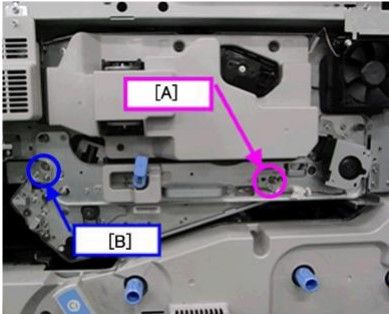
Symptoms Startup error SC471 (ITB transfer belt in situ error) Reason Problem confirmation: Error SC471 reported upon startup Solution 1. Check that the SP2920 value has reached -110, exceeding the normal range. 2. Disassemble the ITB component and check if the transfer belt deviates significantly from its original position, which is consistent with the fault description information. 3. Clean the ITB component and related sensors, adjust the position of the transfer belt, install the ITB component back, and check if the left and right adjustment plate scales are in their original position, as shown in the following figure.
After installation, do not close the front door yet. Turn on the SP2920 and clear the value to 0 before closing the front door. 5. When closing the front door, the machine will perform a small self check action, which also involves a brief adjustment of the transfer belt. After completion, check the SP2920 value. This door closing action, in conjunction with SP2920, can be repeatedly observed multiple times to determine the positive and negative changes and magnitude of the value. Then, the left and right adjustment boards can be used to adjust the+or - values. When the change is small, the 3011 process control adjustment can be used to observe the changes in SP2920. After printing multiple copies for testing, the SP2920 value will only fluctuate slightly within the normal range, from -20 to+20. Attachment: If the value keeps changing in a positive direction, the left or right adjustment board scale will move upwards, otherwise it will move downwards. |
Address of this article:https://073868.com/post/1323.html
Copyright Notice:
For relevant infringements, reports, complaints and suggestions, please send E-mail:weixiuwang68@qq.com






