
|
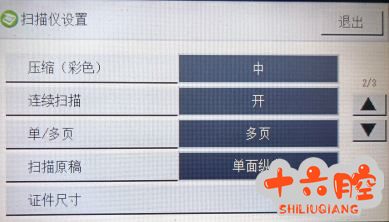
Phenomenon: When scanning multiple original documents on the glass surface of the manuscript table, it is not possible to scan them into multiple pages of files Maintenance process: Settings need to be implemented in the user tool to scan multiple pages of original documents on the glass surface of the manuscript table into one multi page file Solution: Set up according to the following path: Home - User Mode (Upper Right Gear) - Scanner Settings - Continuous Scanning - "On" As shown in the figure below
|
Address of this article:https://073868.com/post/1077.html
Copyright Notice:
For relevant infringements, reports, complaints and suggestions, please send E-mail:weixiuwang68@qq.com
Tags: #Scan #User Mode #C2000 #Glass surface scanning







